<?xml version="1.0" encoding="utf-8"?><feed xmlns="http://www.w3.org/2005/Atom" ><generator uri="https://jekyllrb.com/" version="3.10.0">Jekyll</generator><link href="https://mbaic.github.io/feed.xml" rel="self" type="application/atom+xml" /><link href="https://mbaic.github.io/" rel="alternate" type="text/html" /><updated>2026-11-16T05:48:37+00:00</updated><id>https://mbaic.github.io/feed.xml</id><title type="html">BC &amp;amp; PrintVis · AI/Agents</title><subtitle>Exploring the intersection of AI and AL development.</subtitle><author><name>Milos Baic</name></author><entry><title type="html">Cohestra: One Coordinator, Eight Specialist Agents</title><link href="https://mbaic.github.io/2026/11/13/cohestra-coordinator-specialist-agents-plugin/" rel="alternate" type="text/html" title="Cohestra: One Coordinator, Eight Specialist Agents" /><published>2026-11-13T00:00:00+00:00</published><updated>2026-11-13T00:00:00+00:00</updated><id>https://mbaic.github.io/2026/11/13/cohestra-coordinator-specialist-agents-plugin</id><content type="html" xml:base="https://mbaic.github.io/2026/11/13/cohestra-coordinator-specialist-agents-plugin/"><![CDATA[<h1 id="cohestra-one-coordinator-eight-specialist-agents">Cohestra: One Coordinator, Eight Specialist Agents</h1>

<div class="post-disclaimer">
  <p><strong>Note:</strong> This blog is a personal notebook. I write it to record what I work on, for my own reference, not to publish it on social media or to promote myself. If a post is still useful to you, I am glad, but that is not why it exists.</p>
  <p>This post was published on November 13, 2026. Software versions, product features, links, and tool availability may have changed since then. Always check official documentation for the latest information. Some screenshots show small details. Zoom in on the page to see them clearly.</p>
</div>

<p>An engineering task needs several roles: exploration, design, implementation, tests, security checks, and documentation. A single AI session does all of them in one long context. The context grows, the roles blur, and the result is hard to check.</p>

<p><a href="https://github.com/mbaic/mb-cohestra-agent-plugin">Cohestra</a> is my answer. It is a public agent plugin with one visible agent, the <strong>mb-Cohestra Coordinator</strong>. The coordinator works like the conductor of an orchestra: it plays no instrument, but it decides who plays and when. It defines the result, gives bounded tasks to hidden specialist agents, checks their evidence, and returns one result. The plugin is MIT licensed, and version 0.1.0 is a product preview.</p>

<p>The agents are general software engineering roles. The README examples use AL development for Business Central.</p>

<h2 id="the-agents">The agents</h2>

<p>A <em>specialist</em> is a hidden agent with one engineering role. You cannot select it. Only the coordinator can call it.</p>

<table>
  <thead>
    <tr>
      <th>Agent</th>
      <th>Role</th>
      <th>Copilot tools</th>
    </tr>
  </thead>
  <tbody>
    <tr>
      <td>Coordinator</td>
      <td>Defines the result, delegates, checks outputs, reports one result</td>
      <td><code class="language-plaintext highlighter-rouge">read</code>, <code class="language-plaintext highlighter-rouge">search</code>, <code class="language-plaintext highlighter-rouge">agent</code></td>
    </tr>
    <tr>
      <td>Context Analyst</td>
      <td>Finds files, symbols, dependencies, tests, and repository rules</td>
      <td><code class="language-plaintext highlighter-rouge">read</code>, <code class="language-plaintext highlighter-rouge">search</code></td>
    </tr>
    <tr>
      <td>Software Architect</td>
      <td>Designs boundaries, interfaces, data flow, and migration steps</td>
      <td><code class="language-plaintext highlighter-rouge">read</code>, <code class="language-plaintext highlighter-rouge">search</code></td>
    </tr>
    <tr>
      <td>Implementation Engineer</td>
      <td>Makes focused code and configuration changes</td>
      <td><code class="language-plaintext highlighter-rouge">read</code>, <code class="language-plaintext highlighter-rouge">search</code>, <code class="language-plaintext highlighter-rouge">edit</code>, <code class="language-plaintext highlighter-rouge">execute</code></td>
    </tr>
    <tr>
      <td>Security Engineer</td>
      <td>Assesses trust boundaries, access control, input, and secrets</td>
      <td><code class="language-plaintext highlighter-rouge">read</code>, <code class="language-plaintext highlighter-rouge">search</code>, <code class="language-plaintext highlighter-rouge">execute</code></td>
    </tr>
    <tr>
      <td>Test Engineer</td>
      <td>Designs, writes, and runs focused tests</td>
      <td><code class="language-plaintext highlighter-rouge">read</code>, <code class="language-plaintext highlighter-rouge">search</code>, <code class="language-plaintext highlighter-rouge">edit</code>, <code class="language-plaintext highlighter-rouge">execute</code></td>
    </tr>
    <tr>
      <td>Quality Engineer</td>
      <td>Checks correctness, compatibility, performance, and regression risk</td>
      <td><code class="language-plaintext highlighter-rouge">read</code>, <code class="language-plaintext highlighter-rouge">search</code>, <code class="language-plaintext highlighter-rouge">execute</code></td>
    </tr>
    <tr>
      <td>Documentation Engineer</td>
      <td>Updates affected user, API, and developer documentation</td>
      <td><code class="language-plaintext highlighter-rouge">read</code>, <code class="language-plaintext highlighter-rouge">search</code>, <code class="language-plaintext highlighter-rouge">edit</code></td>
    </tr>
    <tr>
      <td>Pattern Writer</td>
      <td>Produces repetitive edits from a verified local pattern</td>
      <td><code class="language-plaintext highlighter-rouge">read</code>, <code class="language-plaintext highlighter-rouge">search</code>, <code class="language-plaintext highlighter-rouge">edit</code></td>
    </tr>
  </tbody>
</table>

<p>The coordinator has no edit tool and no execute tool. It delegates every change and every command. This keeps its context small and the roles separate.</p>

<h2 id="how-a-task-runs">How a task runs</h2>

<p>You select the coordinator and describe one result. The coordinator then works in this order:</p>

<div style="margin: 1.75rem 0 2rem 0;">
<div style="display:flex; align-items:flex-start; gap:1rem;">
<div style="flex:0 0 36px; width:36px; height:36px; border-radius:50%; background:#00B7C3; color:#ffffff; display:flex; align-items:center; justify-content:center; font-weight:700; box-shadow:0 4px 12px rgba(0,183,195,0.35);">1</div>
<div style="flex:1 1 auto; background:#E8F4F6; border-radius:8px; padding:0.85rem 1.1rem; box-shadow:0 2px 10px rgba(0,183,195,0.18);">
<div style="font-weight:700; color:#3D4B5C; font-size:1.02rem;">Restate the result</div>
<div style="color:#3D4B5C; opacity:0.85; margin-top:0.2rem; font-size:0.92rem;">The coordinator writes down the requested result and the constraints.</div>
</div>
</div>
<div style="padding-left:17px;"><div style="width:2px; height:26px; background:#00B7C3; opacity:0.45;"></div></div>
<div style="display:flex; align-items:flex-start; gap:1rem;">
<div style="flex:0 0 36px; width:36px; height:36px; border-radius:50%; background:#00B7C3; color:#ffffff; display:flex; align-items:center; justify-content:center; font-weight:700; box-shadow:0 4px 12px rgba(0,183,195,0.35);">2</div>
<div style="flex:1 1 auto; background:#E8F4F6; border-radius:8px; padding:0.85rem 1.1rem; box-shadow:0 2px 10px rgba(0,183,195,0.18);">
<div style="font-weight:700; color:#3D4B5C; font-size:1.02rem;">Search the repository</div>
<div style="color:#3D4B5C; opacity:0.85; margin-top:0.2rem; font-size:0.92rem;">It searches first and reads the repository rules before it reads code.</div>
</div>
</div>
<div style="padding-left:17px;"><div style="width:2px; height:26px; background:#00B7C3; opacity:0.45;"></div></div>
<div style="display:flex; align-items:flex-start; gap:1rem;">
<div style="flex:0 0 36px; width:36px; height:36px; border-radius:50%; background:#00B7C3; color:#ffffff; display:flex; align-items:center; justify-content:center; font-weight:700; box-shadow:0 4px 12px rgba(0,183,195,0.35);">3</div>
<div style="flex:1 1 auto; background:#E8F4F6; border-radius:8px; padding:0.85rem 1.1rem; box-shadow:0 2px 10px rgba(0,183,195,0.18);">
<div style="font-weight:700; color:#3D4B5C; font-size:1.02rem;">Delegate bounded tasks</div>
<div style="color:#3D4B5C; opacity:0.85; margin-top:0.2rem; font-size:0.92rem;">Each specialist gets a task, a file scope, constraints, and an output format.</div>
</div>
</div>
<div style="padding-left:17px;"><div style="width:2px; height:26px; background:#00B7C3; opacity:0.45;"></div></div>
<div style="display:flex; align-items:flex-start; gap:1rem;">
<div style="flex:0 0 36px; width:36px; height:36px; border-radius:50%; background:#00B7C3; color:#ffffff; display:flex; align-items:center; justify-content:center; font-weight:700; box-shadow:0 4px 12px rgba(0,183,195,0.35);">4</div>
<div style="flex:1 1 auto; background:#E8F4F6; border-radius:8px; padding:0.85rem 1.1rem; box-shadow:0 2px 10px rgba(0,183,195,0.18);">
<div style="font-weight:700; color:#3D4B5C; font-size:1.02rem;">Check the evidence</div>
<div style="color:#3D4B5C; opacity:0.85; margin-top:0.2rem; font-size:0.92rem;">The coordinator compares each claim with the files and the command output.</div>
</div>
</div>
<div style="padding-left:17px;"><div style="width:2px; height:26px; background:#00B7C3; opacity:0.45;"></div></div>
<div style="display:flex; align-items:flex-start; gap:1rem;">
<div style="flex:0 0 36px; width:36px; height:36px; border-radius:50%; background:#00B7C3; color:#ffffff; display:flex; align-items:center; justify-content:center; font-weight:700; box-shadow:0 4px 12px rgba(0,183,195,0.35);">5</div>
<div style="flex:1 1 auto; background:#E8F4F6; border-radius:8px; padding:0.85rem 1.1rem; box-shadow:0 2px 10px rgba(0,183,195,0.18);">
<div style="font-weight:700; color:#3D4B5C; font-size:1.02rem;">Return one result</div>
<div style="color:#3D4B5C; opacity:0.85; margin-top:0.2rem; font-size:0.92rem;">You get one report with the files changed, the checks run, and the risks.</div>
</div>
</div>
<div style="padding-left:17px;"><div style="width:2px; height:26px; background:#00B7C3; opacity:0.45;"></div></div>
<div style="display:flex; align-items:center; gap:1rem;">
<div style="flex:0 0 36px; width:36px; height:36px; border-radius:50%; background:#3D4B5C; color:#ffffff; display:flex; align-items:center; justify-content:center; font-weight:700; box-shadow:0 4px 12px rgba(61,75,92,0.3);">&#10003;</div>
<div style="color:#3D4B5C; font-weight:600;">You review each change before you release it.</div>
</div>
</div>

<p>Here is a typical AL prompt from the README:</p>

<blockquote>
  <p>Add a Customer Rating field to the Customer table with a table extension. Show it on the Customer Card with a page extension. Use the object ID range from app.json and the name prefix of the other objects. Add an AL test and update the documentation.</p>
</blockquote>

<p>The coordinator can split this prompt across the Implementation, Test, and Documentation Engineers. You still see one result.</p>

<h2 id="the-guard-rails">The guard rails</h2>

<ul>
  <li><strong>One visible agent.</strong> Each specialist sets <code class="language-plaintext highlighter-rouge">user-invocable: false</code>, so the Copilot agent picker shows only the coordinator. The coordinator sets <code class="language-plaintext highlighter-rouge">disable-model-invocation: true</code>, so no other agent can call it.</li>
  <li><strong>No nested delegation.</strong> No specialist has the <code class="language-plaintext highlighter-rouge">agent</code> tool, and each one sets <code class="language-plaintext highlighter-rouge">agents: []</code>. A validator script fails when a specialist breaks this rule.</li>
  <li><strong>Least tools per role.</strong> Each agent gets only the tools that its role needs, as the table above shows.</li>
  <li><strong>No hidden parts.</strong> The package has no hooks, MCP server, background service, or telemetry code. The validator fails on a hooks folder or an <code class="language-plaintext highlighter-rouge">mcp.json</code> file.</li>
</ul>

<h2 id="clients-and-install">Clients and install</h2>

<p>The package follows the Agent Plugins 1.0 standard. The Copilot agent files in <code class="language-plaintext highlighter-rouge">com.github.copilot/agents/</code> are the source of truth. A sync script generates the Claude Code copies from them.</p>

<table>
  <thead>
    <tr>
      <th>Client</th>
      <th>Support</th>
      <th>Install</th>
    </tr>
  </thead>
  <tbody>
    <tr>
      <td>VS Code Copilot Chat</td>
      <td>Yes</td>
      <td>Enable <code class="language-plaintext highlighter-rouge">chat.plugins.enabled</code>, then run <strong>Chat: Install Plugin From Source</strong></td>
    </tr>
    <tr>
      <td>GitHub Copilot CLI</td>
      <td>Yes</td>
      <td><code class="language-plaintext highlighter-rouge">copilot plugin marketplace add mbaic/mb-cohestra-agent-plugin</code>, then <code class="language-plaintext highlighter-rouge">copilot plugin install cohestra@mb-cohestra-agent-plugin</code></td>
    </tr>
    <tr>
      <td>GitHub Copilot app</td>
      <td>Yes</td>
      <td><strong>Customize</strong> → <strong>Plugins</strong>, add the repository as a marketplace, then install <strong>cohestra</strong></td>
    </tr>
    <tr>
      <td>Claude Code</td>
      <td>Compatibility layer</td>
      <td><code class="language-plaintext highlighter-rouge">claude --plugin-dir ./mb-cohestra-agent-plugin</code> from a local clone</td>
    </tr>
  </tbody>
</table>

<p>For the reasons behind one source for several clients, read <a href="/2026/08/12/agent-plugins-1-0-one-al-plugin-three-copilot-clients/">Agent Plugins 1.0: One AL Plugin, Three Clients</a>.</p>

<h2 id="how-it-is-tested">How it is tested</h2>

<p>The repository has three levels of checks. A validator checks the manifests, the agent visibility, the delegation allowlist, and the Claude Code copies. Unit tests run with Python and need no network. Behavioral evals send real prompts to a real model and grade the result. An <em>eval</em> costs model usage, so the README shows how to set a cost ceiling.</p>

<h2 id="risks-and-limits">Risks and limits</h2>

<ul>
  <li><strong>The plugin can change files.</strong> Some specialists have edit and execute tools. The client asks you to approve each action that its rules protect.</li>
  <li><strong>Your code enters the model context.</strong> Check the data policy of your organization before you use Cohestra on private code.</li>
  <li><strong>No fixed token saving.</strong> Rules such as “search before you read” can reduce context use, but Cohestra promises no fixed saving.</li>
  <li><strong>It does not replace the AL compiler.</strong> The agents read AL source as text. Build the app in VS Code to confirm a change.</li>
</ul>

<h2 id="closing-note">Closing note</h2>

<p>One coordinator with narrow specialists gives each role a small context and gives you one result to review. Version 0.1.0 is a preview, and I expect the agent prompts to change. The code is public. Read the agent files, criticize them, and copy the parts that fit your own team.</p>]]></content><author><name>Milos Baic</name></author><category term="Agentic Coding-Reflections" /><category term="github-copilot" /><category term="copilot-cli" /><category term="claude-code" /><category term="vscode" /><category term="agents" /><category term="custom-agents" /><category term="subagents" /><category term="plugins" /><category term="skills" /><category term="evals" /><category term="al" /><category term="business-central" /><summary type="html"><![CDATA[A public agent plugin for GitHub Copilot and Claude Code: one visible coordinator delegates bounded engineering tasks to eight hidden specialists, checks their evidence, and returns one result.]]></summary></entry><entry><title type="html">Site Inspection Scheduling: A Reference PTE in Four Apps</title><link href="https://mbaic.github.io/2026/11/13/site-inspection-scheduling-reference-pte/" rel="alternate" type="text/html" title="Site Inspection Scheduling: A Reference PTE in Four Apps" /><published>2026-11-13T00:00:00+00:00</published><updated>2026-11-13T00:00:00+00:00</updated><id>https://mbaic.github.io/2026/11/13/site-inspection-scheduling-reference-pte</id><content type="html" xml:base="https://mbaic.github.io/2026/11/13/site-inspection-scheduling-reference-pte/"><![CDATA[<h1 id="site-inspection-scheduling-a-reference-pte-in-four-apps">Site Inspection Scheduling: A Reference PTE in Four Apps</h1>

<div class="post-disclaimer">
  <p><strong>Note:</strong> This blog is a personal notebook. I write it to record what I work on, for my own reference, not to publish it on social media or to promote myself. If a post is still useful to you, I am glad, but that is not why it exists.</p>
  <p>This post was published on November 13, 2026. Software versions, product features, links, and tool availability may have changed since then. Always check official documentation for the latest information. Some screenshots show small details. Zoom in on the page to see them clearly.</p>
</div>

<p><a href="https://github.com/mbaic/mbs-site-inspection-scheduling">MBS Site Inspection Scheduling</a> is a public demo per-tenant extension (PTE) for Business Central. It schedules inspections at customer sites, records the findings, and posts them to history. The repository uses the AL-Go for GitHub PTE template. It is MIT licensed and is a demonstration project, not a product.</p>

<p><a href="/2026/02/07/one-pte-four-apps-al-go-site-inspection/">One PTE, Four Apps</a> is the long walk-through of the design. This post is the short version: what the repository contains, what to look at first, and where the demo stops.</p>

<h2 id="the-four-apps">The four apps</h2>

<table>
  <thead>
    <tr>
      <th>Folder</th>
      <th>App</th>
      <th>Purpose</th>
      <th>Object IDs</th>
    </tr>
  </thead>
  <tbody>
    <tr>
      <td><code class="language-plaintext highlighter-rouge">App</code></td>
      <td>MBS Site Inspection Scheduling</td>
      <td>Tables, pages, posting logic, permission set</td>
      <td><code class="language-plaintext highlighter-rouge">50000..50099</code></td>
    </tr>
    <tr>
      <td><code class="language-plaintext highlighter-rouge">App.Test</code></td>
      <td>MBS Site Inspection Scheduling Test</td>
      <td>25 automated tests</td>
      <td><code class="language-plaintext highlighter-rouge">50100..50199</code></td>
    </tr>
    <tr>
      <td><code class="language-plaintext highlighter-rouge">App.PerformanceTest</code></td>
      <td>MBS Site Inspection Scheduling Performance Test</td>
      <td>BCPT scenarios for create, post, query, and contention</td>
      <td><code class="language-plaintext highlighter-rouge">50200..50299</code></td>
    </tr>
    <tr>
      <td><code class="language-plaintext highlighter-rouge">App.Dataset</code></td>
      <td>MBS Site Inspection Scheduling Dataset</td>
      <td>A Contoso Demo Tool module that generates demo data</td>
      <td><code class="language-plaintext highlighter-rouge">50300..50399</code></td>
    </tr>
  </tbody>
</table>

<p>The main app has no external dependencies. The three companion apps get access to its internal objects through <code class="language-plaintext highlighter-rouge">internalsVisibleTo</code>. The test and performance test apps use the Microsoft test libraries. The dataset app needs the Contoso Coffee Demo Dataset. All four apps target Business Central online, platform 28.0, runtime 17.0.</p>

<p>This split keeps test and demo code out of the production app. A customer environment needs only the main app.</p>

<h2 id="the-posting-pattern">The posting pattern</h2>

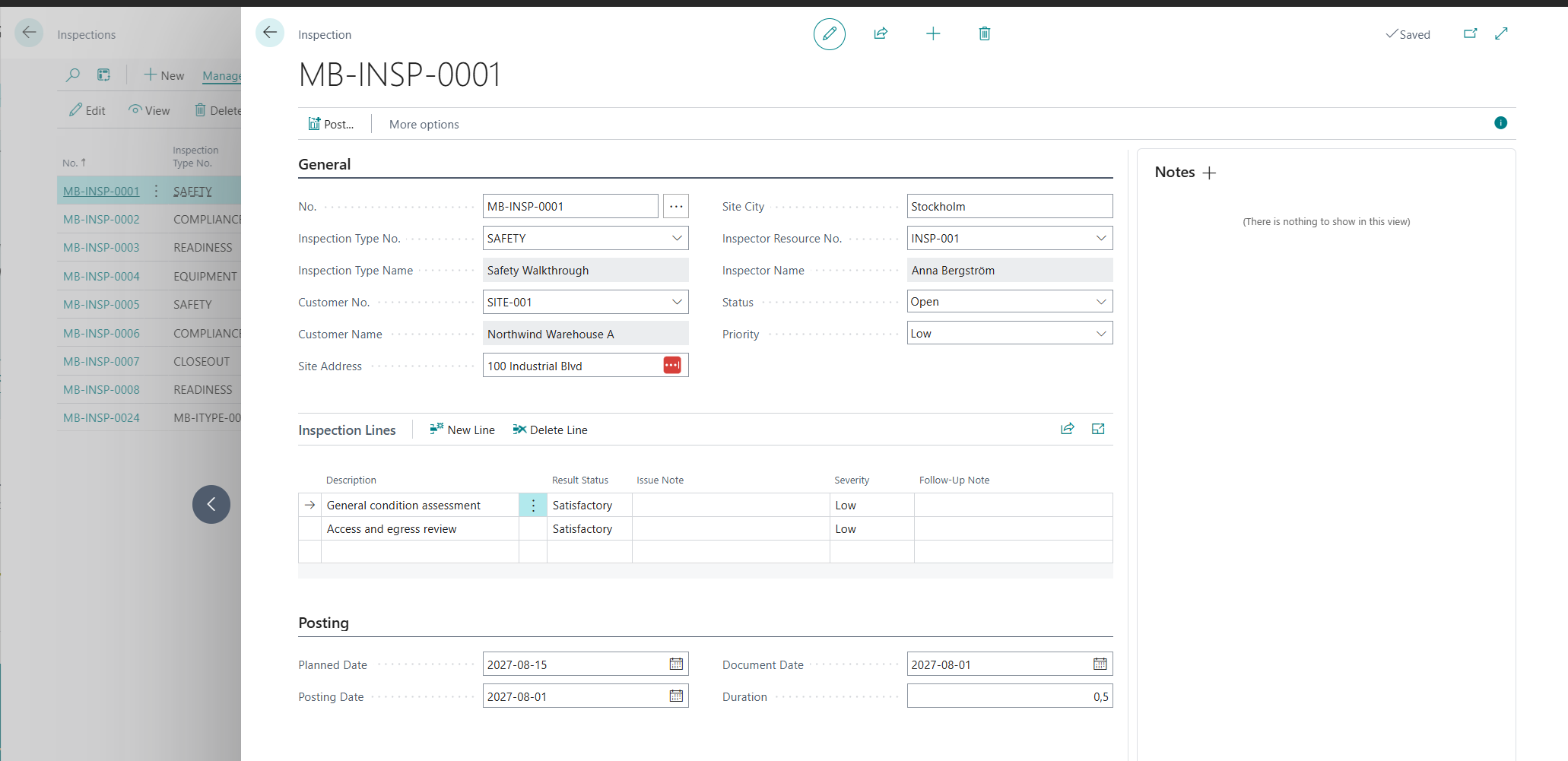
<p>The main app follows the standard Business Central document pattern. An inspection is a document with a header and checklist lines. A customer is the site, and a resource of type Person is the inspector. Number series and a source code (<code class="language-plaintext highlighter-rouge">MBSINSP</code>) give the numbering and the audit trail.</p>

<p><img src="/assets/images/in_posts/site-inspection/inspection-document.png" alt="Inspection document MB-INSP-0001 with General fields, two satisfactory checklist lines, and Posting dates" /></p>

<p>Posting (F9) runs five steps:</p>

<div style="margin: 1.75rem 0 2rem 0;">
<div style="display:flex; align-items:flex-start; gap:1rem;">
<div style="flex:0 0 36px; width:36px; height:36px; border-radius:50%; background:#00B7C3; color:#ffffff; display:flex; align-items:center; justify-content:center; font-weight:700; box-shadow:0 4px 12px rgba(0,183,195,0.35);">1</div>
<div style="flex:1 1 auto; background:#E8F4F6; border-radius:8px; padding:0.85rem 1.1rem; box-shadow:0 2px 10px rgba(0,183,195,0.18);">
<div style="font-weight:700; color:#3D4B5C; font-size:1.02rem;">Validate the document</div>
<div style="color:#3D4B5C; opacity:0.85; margin-top:0.2rem; font-size:0.92rem;">The routine checks the header and the lines, and the status must be Closed.</div>
</div>
</div>
<div style="padding-left:17px;"><div style="width:2px; height:26px; background:#00B7C3; opacity:0.45;"></div></div>
<div style="display:flex; align-items:flex-start; gap:1rem;">
<div style="flex:0 0 36px; width:36px; height:36px; border-radius:50%; background:#00B7C3; color:#ffffff; display:flex; align-items:center; justify-content:center; font-weight:700; box-shadow:0 4px 12px rgba(0,183,195,0.35);">2</div>
<div style="flex:1 1 auto; background:#E8F4F6; border-radius:8px; padding:0.85rem 1.1rem; box-shadow:0 2px 10px rgba(0,183,195,0.18);">
<div style="font-weight:700; color:#3D4B5C; font-size:1.02rem;">Assign a posting number</div>
<div style="color:#3D4B5C; opacity:0.85; margin-top:0.2rem; font-size:0.92rem;">The posted document gets its number from its own number series.</div>
</div>
</div>
<div style="padding-left:17px;"><div style="width:2px; height:26px; background:#00B7C3; opacity:0.45;"></div></div>
<div style="display:flex; align-items:flex-start; gap:1rem;">
<div style="flex:0 0 36px; width:36px; height:36px; border-radius:50%; background:#00B7C3; color:#ffffff; display:flex; align-items:center; justify-content:center; font-weight:700; box-shadow:0 4px 12px rgba(0,183,195,0.35);">3</div>
<div style="flex:1 1 auto; background:#E8F4F6; border-radius:8px; padding:0.85rem 1.1rem; box-shadow:0 2px 10px rgba(0,183,195,0.18);">
<div style="font-weight:700; color:#3D4B5C; font-size:1.02rem;">Create the posted document</div>
<div style="color:#3D4B5C; opacity:0.85; margin-top:0.2rem; font-size:0.92rem;">The routine copies the header, the lines, and the comments to the posted tables.</div>
</div>
</div>
<div style="padding-left:17px;"><div style="width:2px; height:26px; background:#00B7C3; opacity:0.45;"></div></div>
<div style="display:flex; align-items:flex-start; gap:1rem;">
<div style="flex:0 0 36px; width:36px; height:36px; border-radius:50%; background:#00B7C3; color:#ffffff; display:flex; align-items:center; justify-content:center; font-weight:700; box-shadow:0 4px 12px rgba(0,183,195,0.35);">4</div>
<div style="flex:1 1 auto; background:#E8F4F6; border-radius:8px; padding:0.85rem 1.1rem; box-shadow:0 2px 10px rgba(0,183,195,0.18);">
<div style="font-weight:700; color:#3D4B5C; font-size:1.02rem;">Write the ledger entry</div>
<div style="color:#3D4B5C; opacity:0.85; margin-top:0.2rem; font-size:0.92rem;">The routine writes one inspection ledger entry and updates the register.</div>
</div>
</div>
<div style="padding-left:17px;"><div style="width:2px; height:26px; background:#00B7C3; opacity:0.45;"></div></div>
<div style="display:flex; align-items:flex-start; gap:1rem;">
<div style="flex:0 0 36px; width:36px; height:36px; border-radius:50%; background:#00B7C3; color:#ffffff; display:flex; align-items:center; justify-content:center; font-weight:700; box-shadow:0 4px 12px rgba(0,183,195,0.35);">5</div>
<div style="flex:1 1 auto; background:#E8F4F6; border-radius:8px; padding:0.85rem 1.1rem; box-shadow:0 2px 10px rgba(0,183,195,0.18);">
<div style="font-weight:700; color:#3D4B5C; font-size:1.02rem;">Delete the source document</div>
<div style="color:#3D4B5C; opacity:0.85; margin-top:0.2rem; font-size:0.92rem;">The routine removes the open document, its lines, and its comments.</div>
</div>
</div>
<div style="padding-left:17px;"><div style="width:2px; height:26px; background:#00B7C3; opacity:0.45;"></div></div>
<div style="display:flex; align-items:center; gap:1rem;">
<div style="flex:0 0 36px; width:36px; height:36px; border-radius:50%; background:#3D4B5C; color:#ffffff; display:flex; align-items:center; justify-content:center; font-weight:700; box-shadow:0 4px 12px rgba(61,75,92,0.3);">&#10003;</div>
<div style="color:#3D4B5C; font-weight:600;">You review the result in Posted Inspections, Inspection Ledger Entries, and Inspection Registers.</div>
</div>
</div>

<p>A Business Central consultant knows this shape from sales and purchase posting. That is the point. A familiar pattern works like a standard keyboard layout: anyone who sits down can type at once. It makes a PTE easier to support, extend, and hand over.</p>

<h2 id="the-delivery-layer">The delivery layer</h2>

<p>AL-Go workflows build and test all four apps on each push to <code class="language-plaintext highlighter-rouge">main</code>, <code class="language-plaintext highlighter-rouge">release/*</code>, and <code class="language-plaintext highlighter-rouge">feature/*</code> branches. A pull request handler validates each pull request to <code class="language-plaintext highlighter-rouge">main</code>. The <code class="language-plaintext highlighter-rouge">NextMinor</code> and <code class="language-plaintext highlighter-rouge">NextMajor</code> workflows build the apps against the next Business Central versions. A partner can find an upgrade problem before the customer’s update window opens.</p>

<h2 id="try-it">Try it</h2>

<p>Publish the <code class="language-plaintext highlighter-rouge">App</code> project to a Business Central 28 sandbox. Open <strong>Inspection Setup</strong> and set the number series. Create an inspection, add checklist lines, set the status to <strong>Closed</strong>, and post it. To fill a sandbox fast, publish <code class="language-plaintext highlighter-rouge">App.Dataset</code> and run the <em>Site Inspection Scheduling</em> module in the <strong>Contoso Demo Tool</strong>. It creates scheduled, overdue, and posted inspections in one run.</p>

<h2 id="what-is-intentionally-simple">What is intentionally simple</h2>

<ul>
  <li><strong>One permission set and one ledger entry type.</strong> All personas share the same access.</li>
  <li><strong>Overdue work is a filter.</strong> It means an open status and a planned date in the past.</li>
  <li><strong>No extras.</strong> The app has no reports, APIs, role center, extension events, or telemetry.</li>
  <li><strong>Demo scale.</strong> The data and the tests show the pattern, not every case.</li>
</ul>

<h2 id="risks-and-limits">Risks and limits</h2>

<ul>
  <li><strong>Immutability is page-level only.</strong> The posted and ledger pages are read-only. The tables have no modify or delete guards, and the permission set gives full access. The test suite documents this gap.</li>
  <li><strong>Status transitions are not enforced.</strong> The only rule is that posting requires the status Closed.</li>
  <li><strong>Two setup fields have no logic yet.</strong> The app stores <code class="language-plaintext highlighter-rouge">Default Duration</code> and <code class="language-plaintext highlighter-rouge">Overdue Threshold Days</code>, but no code reads them.</li>
  <li><strong>Sandbox only.</strong> The repository is not packaged or validated for AppSource.</li>
</ul>

<h2 id="closing-note">Closing note</h2>

<p>A small business scenario keeps the structure easy to see. Four apps, one posting routine, and the standard ledger pattern cover most of what a real PTE needs on day one. The code is public. Read it, criticize it, and use the parts that fit your own extensions.</p>]]></content><author><name>Milos Baic</name></author><category term="AL-Architecture-Reflections" /><category term="business-central" /><category term="al" /><category term="al-go" /><category term="pte" /><category term="extension-architecture" /><category term="posting" /><category term="testing" /><category term="bcpt" /><category term="demo-data" /><summary type="html"><![CDATA[A short tour of a public demo per-tenant extension on AL-Go for GitHub: a main app, a test app, a performance test app, and a demo data app, built around the standard Business Central posting pattern.]]></summary></entry><entry><title type="html">Naming the Skill: Calling interactive-canvas in Copilot for Excel</title><link href="https://mbaic.github.io/2026/11/01/excel-interactive-canvas-skill-copilot/" rel="alternate" type="text/html" title="Naming the Skill: Calling interactive-canvas in Copilot for Excel" /><published>2026-11-01T00:00:00+00:00</published><updated>2026-11-01T00:00:00+00:00</updated><id>https://mbaic.github.io/2026/11/01/excel-interactive-canvas-skill-copilot</id><content type="html" xml:base="https://mbaic.github.io/2026/11/01/excel-interactive-canvas-skill-copilot/"><![CDATA[<h1 id="naming-the-skill-calling-interactive-canvas-in-copilot-for-excel">Naming the Skill: Calling interactive-canvas in Copilot for Excel</h1>

<div class="post-disclaimer">
  <p><strong>Note:</strong> This blog is a personal notebook. I write it to record what I work on, for my own reference, not to publish it on social media or to promote myself. If a post is still useful to you, I am glad, but that is not why it exists.</p>
  <p>This post was published on November 01, 2026. Software versions, product features, links, and tool availability may have changed since then. Always check official documentation for the latest information. Some screenshots show small details. Zoom in on the page to see them clearly.</p>
</div>

<p>My <a href="/2026/10/31/excel-copilot-interactive-dashboard/">last Excel post</a> used a generic prompt: “create an interactive dashboard”. This post names the skill in the prompt. Microsoft lists <a href="https://support.microsoft.com/en-us/excel/copilot/copilot-in-excel-built-in-skills">interactive-canvas</a> as a built-in Copilot in Excel skill. The test uses the same synthetic sales data, framed as a Business Central (BC) export.</p>

<h2 id="problem">Problem</h2>

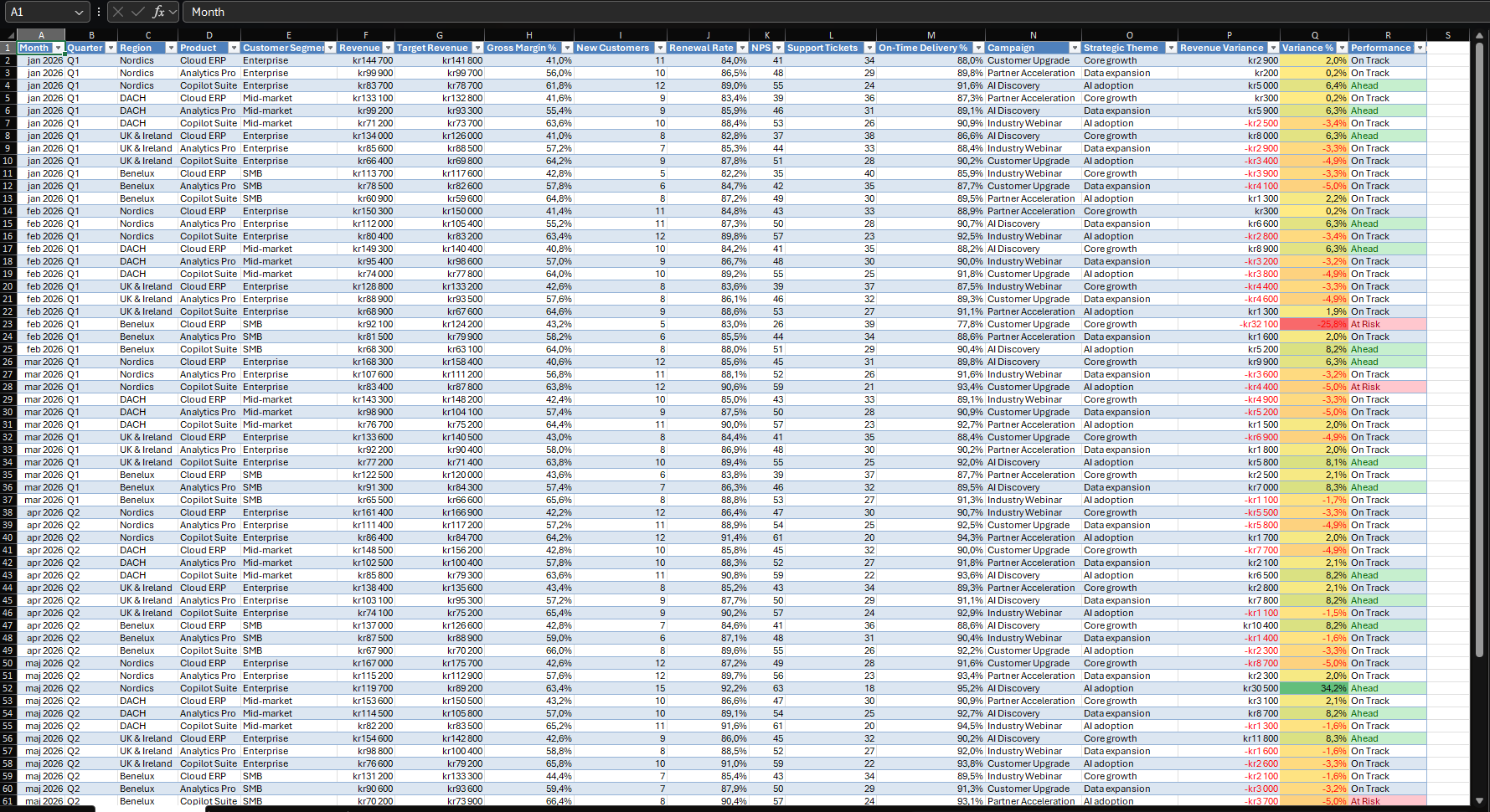
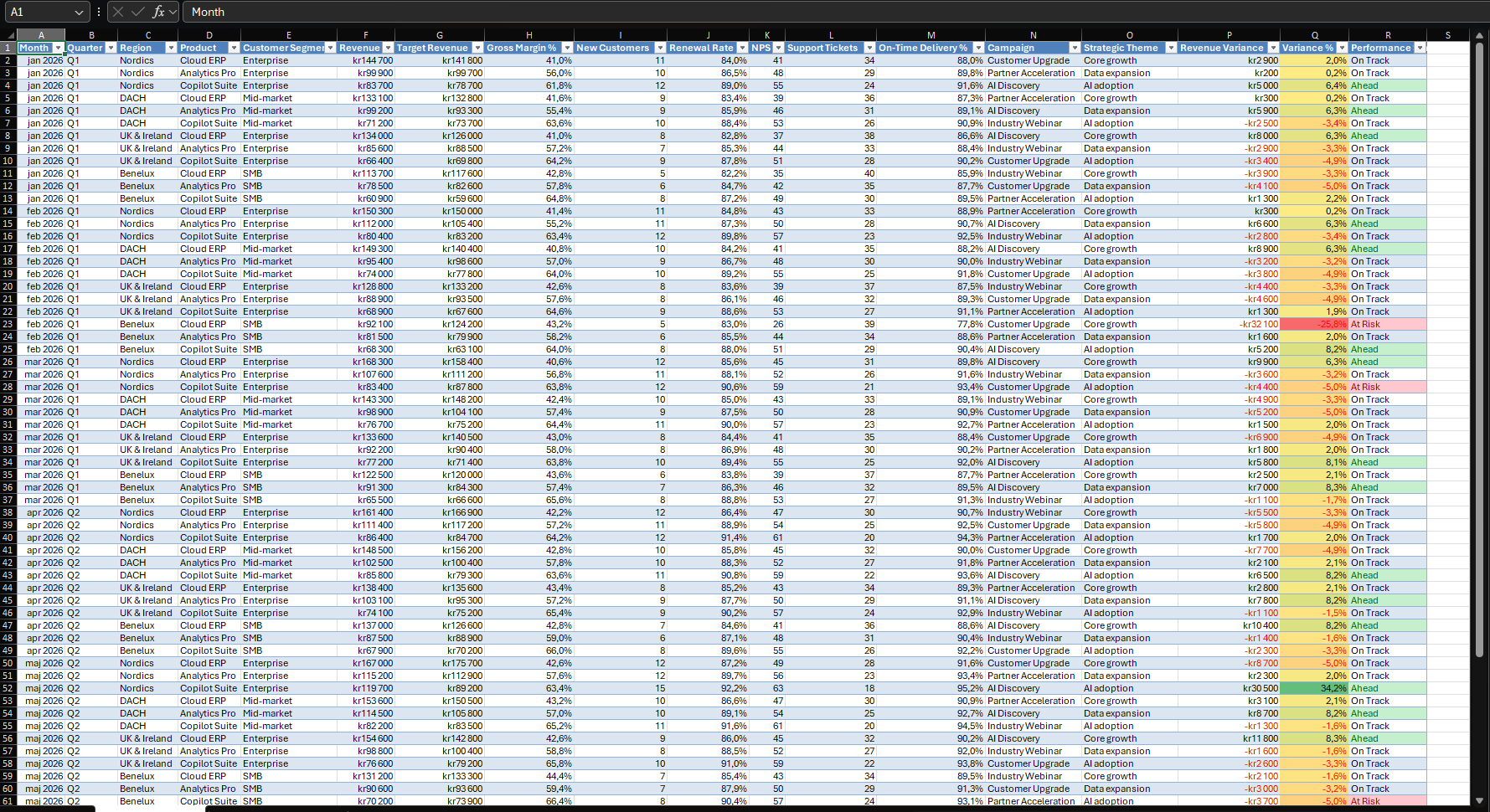
<p>Scenario: a sales lead uses <strong>Open in Excel</strong> on a BC list and gets 72 rows of monthly performance data: revenue, target, margin, new customers, and delivery. The lead needs a view that a manager can filter without help.</p>

<p>A generic prompt gives a dashboard, but the user does not control how Copilot builds it. Naming the skill is like asking for a hairdresser by name: you know who does the work. The question is whether the result is also more predictable.</p>

<p><img src="/assets/images/in_posts/Office/xlsx-interactive-canvas/01-excel-source-data.png" alt="Excel sheet Performance Data with 72 records, filter headers, and conditional formatting for Ahead and At Risk" /></p>

<h2 id="why-this-matters">Why this matters</h2>

<p>Microsoft describes the skill as a way to build <a href="https://support.microsoft.com/en-us/excel/copilot/copilot-in-excel-built-in-skills">dashboards and reports from workbook data</a>. It says the canvas stays connected to the workbook and updates as the data changes, and that the skill is enabled by default.</p>

<p>Skills have a control surface. You can <a href="https://support.microsoft.com/en-US/Excel/copilot/copilot-in-excel-skills">pick a skill from the Choose plugins and skills menu or type it with an @mention</a>. You can switch skills on or off in <strong>Manage plugins &amp; skills</strong>. A skill that is off can still run with a direct @mention.</p>

<h2 id="architecture">Architecture</h2>

<p>Pattern: read-only toward Business Central. Inside Excel, Copilot writes a new sheet.</p>

<table>
  <thead>
    <tr>
      <th>Layer</th>
      <th>Runs where</th>
      <th>Role in this demo</th>
    </tr>
  </thead>
  <tbody>
    <tr>
      <td>Business Central</td>
      <td>Inside BC</td>
      <td>Source of the data in a real case. Not used in the demo.</td>
    </tr>
    <tr>
      <td>Excel workbook</td>
      <td>Excel</td>
      <td>Sheet Performance Data with 72 records.</td>
    </tr>
    <tr>
      <td>Copilot in Excel with the interactive-canvas skill</td>
      <td>Microsoft 365</td>
      <td>Reads the sheet and builds the canvas.</td>
    </tr>
    <tr>
      <td>Commercial Pulse sheet</td>
      <td>Inside the workbook</td>
      <td>Filters, KPI cards, and chart panels.</td>
    </tr>
  </tbody>
</table>

<p><strong>Assumption:</strong> the workbook has synthetic data and stands in for a BC export.</p>

<p>Skills do not move the trust boundary. Microsoft says skills <a href="https://support.microsoft.com/en-us/excel/copilot/frequently-asked-questions-about-copilot-in-excel">do not add a new code-execution mechanism to Excel</a>. The data boundary is the export, and the user needs the <a href="https://learn.microsoft.com/en-us/dynamics365/business-central/about-export-data">D365 Excel Export Action permission set or system permission 6110</a> for it. Use Open in Excel, not Edit in Excel. <a href="https://learn.microsoft.com/en-us/dynamics365/business-central/across-work-with-excel">Open in Excel does not publish changes back to BC</a>.</p>

<h2 id="demo-steps">Demo steps</h2>

<ol>
  <li>Keep the data in a table with clear headers. Microsoft’s <a href="https://excel.cloud.microsoft/create/en/dashboards/">dashboard page</a> gives the same advice.</li>
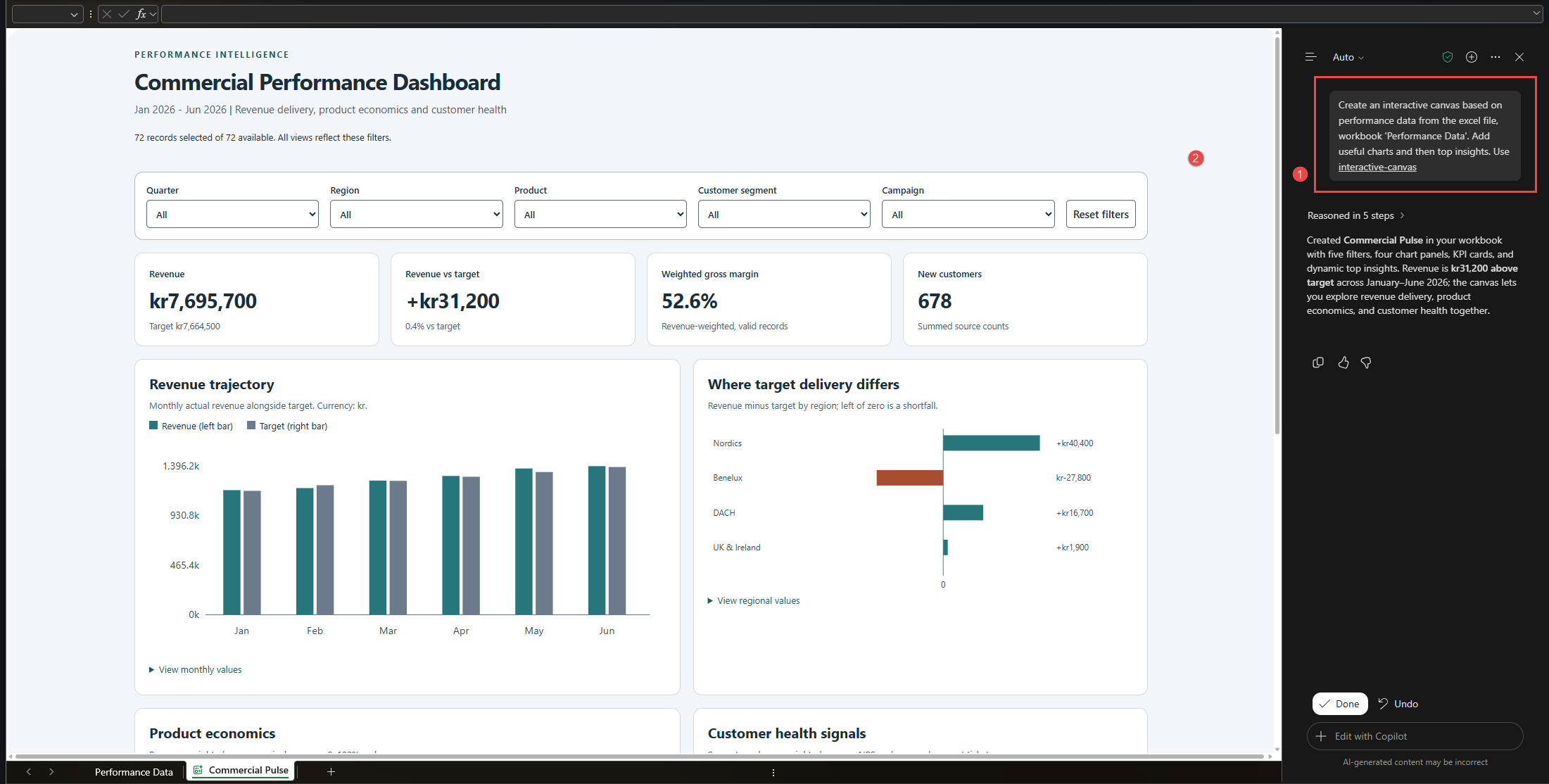
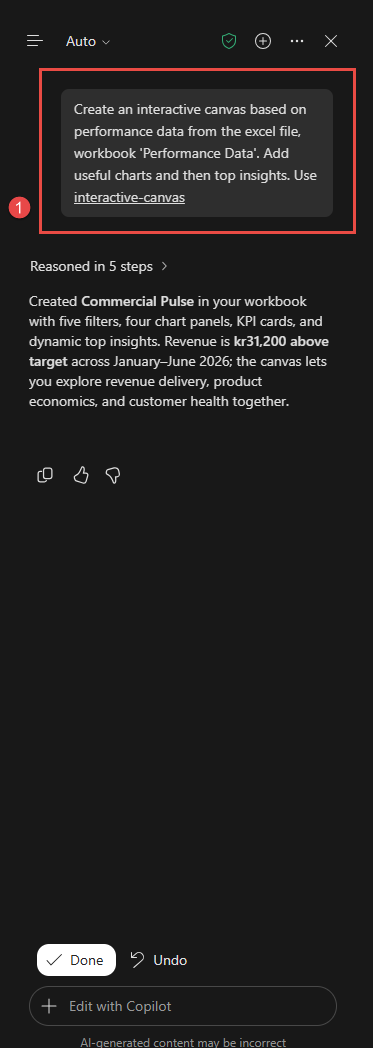
  <li>Open the Copilot pane and send this prompt: <code class="language-plaintext highlighter-rouge">Create an interactive canvas based on performance data from the excel file, workbook 'Performance Data'. Add useful charts and then top insights. Use interactive-canvas</code>.</li>
  <li>
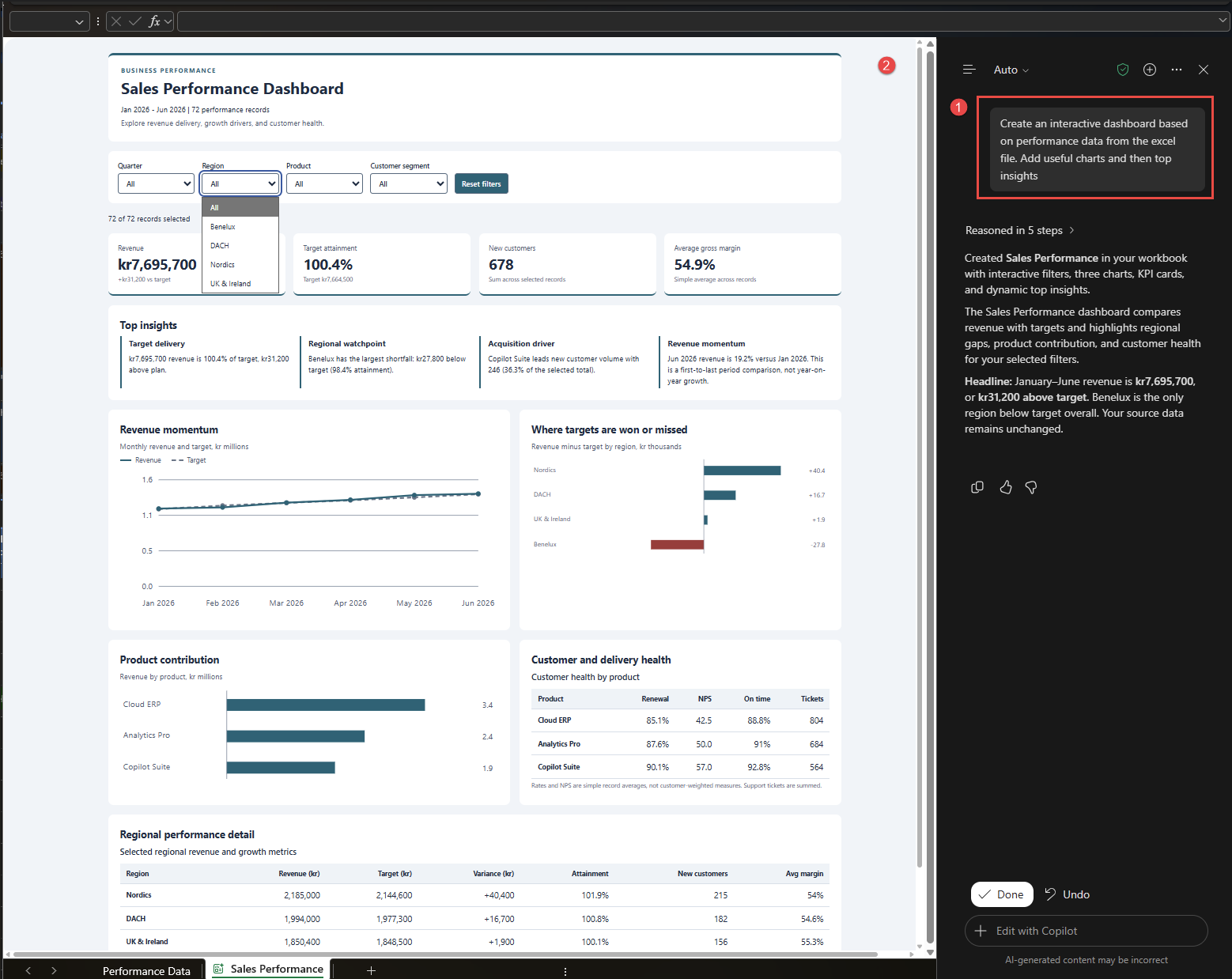
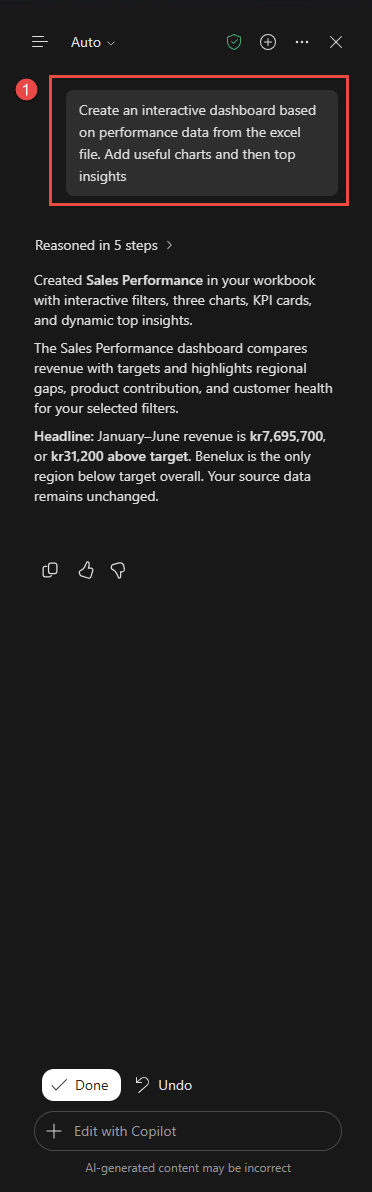
    <p>Read the response. Copilot reasoned in five steps and created a sheet named Commercial Pulse. It reports five filters, four chart panels, KPI cards, and top insights. The pane shows <strong>Done</strong> and <strong>Undo</strong>.</p>

    <p>The prompt ends with the skill name. Microsoft documents <code class="language-plaintext highlighter-rouge">@interactive-canvas</code> for this call, and my prompt has no @ sign. The pane shows the name as a link, so I assume Copilot recognized it.</p>

    <p><img src="/assets/images/in_posts/Office/xlsx-interactive-canvas/02-excel-copilot-skill-prompt-and-canvas.png" alt="Excel with the Copilot prompt marked 1 and the generated Commercial Performance Dashboard marked 2" /></p>

    <p><img src="/assets/images/in_posts/Office/xlsx-interactive-canvas/03-excel-copilot-skill-prompt-and-response.png" alt="Copilot pane with the prompt that names interactive-canvas, the response, and the Done and Undo buttons" /></p>
  </li>
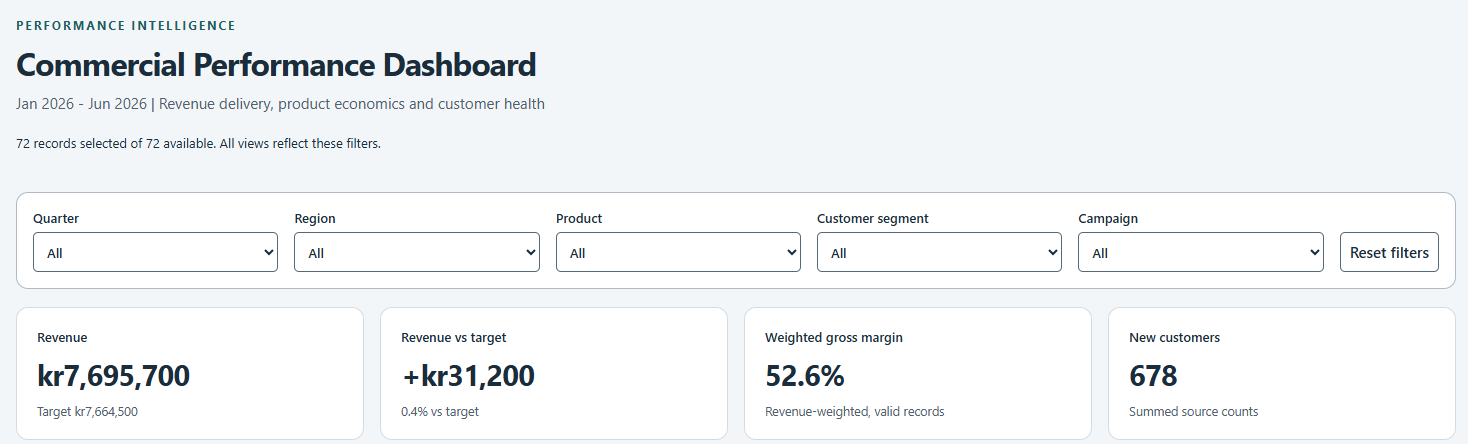
  <li>Check the filters: Quarter, Region, Product, Customer segment, and Campaign. The header reads 72 records selected of 72 available. Choose a value and check that the views change.</li>
  <li>
    <p>Check the KPI cards. Revenue is kr7,695,700 against a target of kr7,664,500. Revenue vs target is +kr31,200. Weighted gross margin is 52.6%. New customers are 678.</p>

    <p><img src="/assets/images/in_posts/Office/xlsx-interactive-canvas/04-excel-canvas-filters-and-kpis.png" alt="Dashboard header, five filters, and four KPI cards" /></p>
  </li>
  <li>
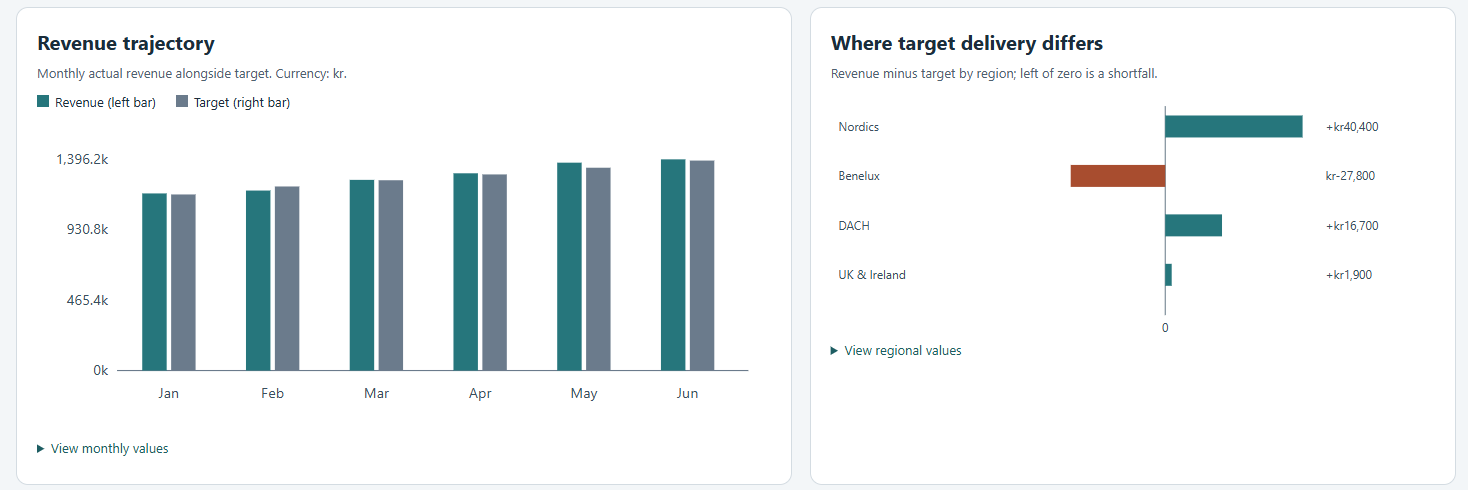
    <p>Read the charts. Revenue trajectory shows revenue and target as paired monthly bars. Where target delivery differs shows revenue minus target by region. The two visible panels each have a collapsible list of values.</p>

    <p><img src="/assets/images/in_posts/Office/xlsx-interactive-canvas/05-excel-canvas-charts.png" alt="Revenue trajectory bar chart and target delivery by region chart" /></p>
  </li>
</ol>

<p>My screenshots stop above the Product economics and Customer health signals panels and the top insights, so this post makes no claim about them.</p>

<h2 id="what-is-intentionally-simple">What is intentionally simple</h2>

<ul>
  <li>One prompt. One run. No layout or color instructions.</li>
  <li>One synthetic workbook. No live BC connection and no refresh.</li>
  <li>No custom skill, no workbook rules, and no brand kit.</li>
  <li>No test on Excel for the web or on Mac.</li>
</ul>

<h2 id="risks-and-limits">Risks and limits</h2>

<ul>
  <li><strong>One run each.</strong> Copilot output varies, so I cannot say that naming the skill caused the differences.</li>
  <li><strong>The runs differ.</strong> The unnamed run made a sheet named Sales Performance with four filters and three charts. It showed 54.9% as a simple average margin. This run made Commercial Pulse with five filters, including Campaign, and four chart panels. It shows 52.6% as a revenue-weighted margin.</li>
  <li><strong>Verify the numbers.</strong> I checked revenue, target, new customers, the regional gaps, and the 52.6% margin against the source rows, and they match. A reader must still check the metric definition on each card.</li>
  <li><strong>Metric choice is not stable.</strong> The same data gave two margin figures in two runs. If the definition matters, write it in the prompt.</li>
  <li><strong>Language.</strong> Microsoft says Copilot was <a href="https://support.microsoft.com/en-us/excel/copilot/frequently-asked-questions-about-copilot-in-excel">trained mostly on English sources</a> and can perform less well with other languages. My Copilot pane is in English and my workbook uses Swedish number and date formats. The canvas shows the amounts in English format.</li>
  <li><strong>Availability.</strong> The <a href="https://support.microsoft.com/en-us/excel/copilot/copilot-in-excel-built-in-skills">built-in skills page</a> says the skill is rolling out and may not be available for all customers. The <a href="https://techcommunity.microsoft.com/blog/microsoft-copilot-blog/what%E2%80%99s-new-in-microsoft-copilot--october-2026/4568528">October Copilot update</a> says Insiders in October and worldwide in November. Check your own tenant.</li>
  <li><strong>Not a governed report.</strong> BC permissions do not follow the exported data, so anyone with the file sees all rows in it.</li>
</ul>

<h2 id="next-iteration">Next iteration</h2>

<ul>
  <li>Save the margin rule. Microsoft says a recorded task can be saved as <a href="https://support.microsoft.com/en-us/excel/copilot/copilot-in-excel-record-a-skill">workbook rules in a .Rules worksheet</a>. Rules stay with the workbook. Test if a rule like “margin weighted by revenue” stabilizes the card.</li>
  <li>Test if the canvas updates when one source value changes. I did not run this.</li>
  <li>Test a refresh from Edit in Excel. Microsoft does not document this combination.</li>
</ul>

<h2 id="closing-note">Closing note</h2>

<p>Naming the skill is cheap and gives you a documented control point. It did not give a fixed layout in my test. Treat the canvas as a fast draft and fix the metric definitions in the prompt or in workbook rules.</p>]]></content><author><name>Milos Baic</name></author><category term="Office-Reflections" /><category term="business-central" /><category term="copilot" /><category term="excel" /><category term="interactive-canvas" /><category term="copilot-skills" /><category term="open-in-excel" /><category term="ai" /><summary type="html"><![CDATA[A short test of the interactive-canvas skill in Copilot for Excel, called by name on a Business Central style export, with notes on how the result differs from an unnamed prompt.]]></summary></entry><entry><title type="html">Excel Interactive Canvas: A Copilot Dashboard from a Business Central Style Export</title><link href="https://mbaic.github.io/2026/10/31/excel-copilot-interactive-dashboard/" rel="alternate" type="text/html" title="Excel Interactive Canvas: A Copilot Dashboard from a Business Central Style Export" /><published>2026-10-31T00:00:00+00:00</published><updated>2026-10-31T00:00:00+00:00</updated><id>https://mbaic.github.io/2026/10/31/excel-copilot-interactive-dashboard</id><content type="html" xml:base="https://mbaic.github.io/2026/10/31/excel-copilot-interactive-dashboard/"><![CDATA[<h1 id="excel-interactive-canvas-a-copilot-dashboard-from-a-business-central-style-export">Excel Interactive Canvas: A Copilot Dashboard from a Business Central Style Export</h1>

<div class="post-disclaimer">
  <p><strong>Note:</strong> This blog is a personal notebook. I write it to record what I work on, for my own reference, not to publish it on social media or to promote myself. If a post is still useful to you, I am glad, but that is not why it exists.</p>
  <p>This post was published on October 31, 2026. Software versions, product features, links, and tool availability may have changed since then. Always check official documentation for the latest information. Some screenshots show small details. Zoom in on the page to see them clearly.</p>
</div>

<p>Copilot in Excel can now build an interactive dashboard from one prompt. Microsoft calls the feature <a href="https://techcommunity.microsoft.com/blog/excelblog/beyond-analysis-copilot-gets-to-work-in-excel/4517581">interactive canvas</a>. The <a href="/2026/10/25/powerpoint-interactive-slides-copilot-executive-dashboard/">previous post</a> tested the PowerPoint version. This post tests the Excel version on the same synthetic sales data, from a Business Central (BC) point of view.</p>

<h2 id="problem">Problem</h2>

<p>Scenario: a sales lead exports a BC list with <strong>Open in Excel</strong>. The sheet is a flat table with 72 rows of monthly performance data. It answers every question, but only after manual work with PivotTables, slicers, and charts.</p>

<p>The goal is a one-prompt dashboard that a manager can filter without help.</p>

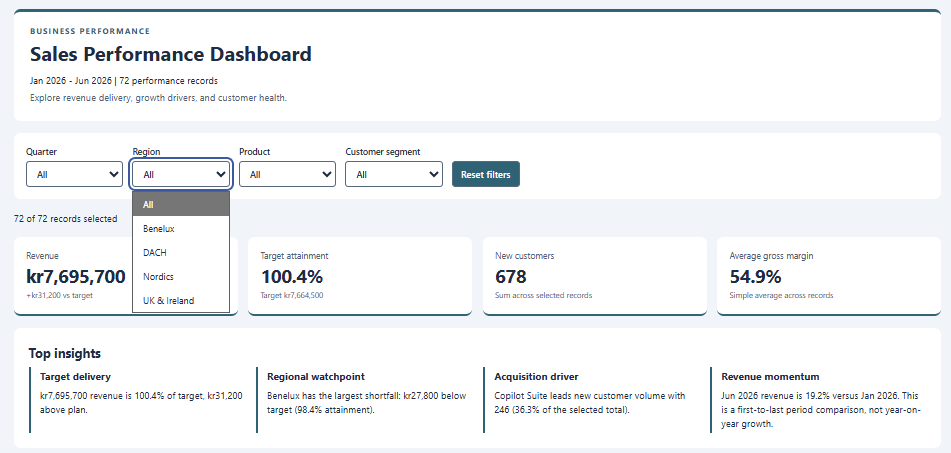
<p><img src="/assets/images/in_posts/Office/xlsx-interactive-dashboard/01-excel-source-data.png" alt="Excel sheet Performance Data with 72 records, filter headers, and conditional formatting for Ahead and At Risk" /></p>

<h2 id="why-this-matters">Why this matters</h2>

<p>BC reports often end in Excel. The reader of that file rarely wants to build a PivotTable. A dashboard inside the same workbook removes one hand-off.</p>

<p>Microsoft documents the <a href="https://support.microsoft.com/en-us/excel/copilot/copilot-in-excel-built-in-skills">interactive-canvas skill</a> as a way to create dashboards and reports from workbook data. It says the canvas stays connected to the workbook and updates automatically. The pane in my test does not name the skill, and I did not call it with <code class="language-plaintext highlighter-rouge">@interactive-canvas</code>. I assume it ran, because the result matches the description.</p>

<p>The cost is one prompt. The trade-off is control, because the prompt does not fix the layout. Think of a ready meal: it is on the table in minutes, but you still read the label.</p>

<h2 id="architecture">Architecture</h2>

<p>Pattern: read-only toward Business Central. Inside Excel, Copilot writes a new sheet.</p>

<table>
  <thead>
    <tr>
      <th>Layer</th>
      <th>Runs where</th>
      <th>Role in this demo</th>
    </tr>
  </thead>
  <tbody>
    <tr>
      <td>Business Central</td>
      <td>Inside BC</td>
      <td>Source of the data in a real case. Not used in the demo.</td>
    </tr>
    <tr>
      <td>Excel workbook</td>
      <td>Excel</td>
      <td>Sheet Performance Data with 72 records.</td>
    </tr>
    <tr>
      <td>Copilot in Excel</td>
      <td>Microsoft 365</td>
      <td>Reads the workbook and builds the canvas.</td>
    </tr>
    <tr>
      <td>Sales Performance sheet</td>
      <td>Inside the workbook</td>
      <td>Filters, KPI cards, insights, charts, and tables.</td>
    </tr>
  </tbody>
</table>

<p><strong>Assumption:</strong> the workbook has synthetic data and stands in for a BC export.</p>

<p>Two boundaries matter in a real case. First, data leaves BC when the user exports it. The user needs the <a href="https://learn.microsoft.com/en-us/dynamics365/business-central/about-export-data">D365 Excel Export Action permission set or system permission 6110</a>. Second, <a href="https://learn.microsoft.com/en-us/dynamics365/business-central/across-work-with-excel"><strong>Open in Excel</strong> does not publish changes back to BC, but <strong>Edit in Excel</strong> does</a>. Use Open in Excel for dashboards, so that a Copilot workbook stays away from the publish path.</p>

<p>The design differs from the previous post. A PowerPoint interactive slide holds a copy of the data and does not follow the workbook, but the Excel canvas lives in the workbook.</p>

<h2 id="demo-steps">Demo steps</h2>

<ol>
  <li>Format the data as a table with clear headers. Microsoft’s <a href="https://excel.cloud.microsoft/create/en/dashboards/">dashboard guidance</a> asks for the same.</li>
  <li>Open Copilot with the icon in the lower-right corner. Microsoft says <a href="https://support.microsoft.com/en-us/excel/copilot/get-started-with-copilot-in-excel">edit mode is the default</a>.</li>
  <li>Send this prompt: <code class="language-plaintext highlighter-rouge">Create an interactive dashboard based on performance data from the excel file. Add useful charts and then top insights</code>.</li>
  <li>
    <p>Read the response. Copilot reasoned in five steps and created a sheet named Sales Performance. The pane shows <strong>Done</strong> and <strong>Undo</strong>.</p>

    <p><img src="/assets/images/in_posts/Office/xlsx-interactive-dashboard/02-excel-copilot-prompt-and-dashboard.png" alt="Excel with the Copilot prompt marked 1 and the generated dashboard marked 2" /></p>

    <p><img src="/assets/images/in_posts/Office/xlsx-interactive-dashboard/03-excel-copilot-prompt-and-response.png" alt="Copilot pane with the prompt, the response, and the Done and Undo buttons" /></p>
  </li>
  <li>Open the filters. The dashboard has Quarter, Region, Product, and Customer segment. A Reset filters button clears them. The counter reads 72 of 72 records selected. Choose a region and check that the cards, insights, and charts change.</li>
  <li>
    <p>Read the top insights. The canvas shows four: target delivery, a Benelux watchpoint, Copilot Suite as the acquisition driver, and revenue momentum.</p>

    <p><img src="/assets/images/in_posts/Office/xlsx-interactive-dashboard/04-excel-dashboard-filters-kpis-insights.png" alt="Dashboard header with the open Region filter, four KPI cards, and four top insights" /></p>
  </li>
  <li>
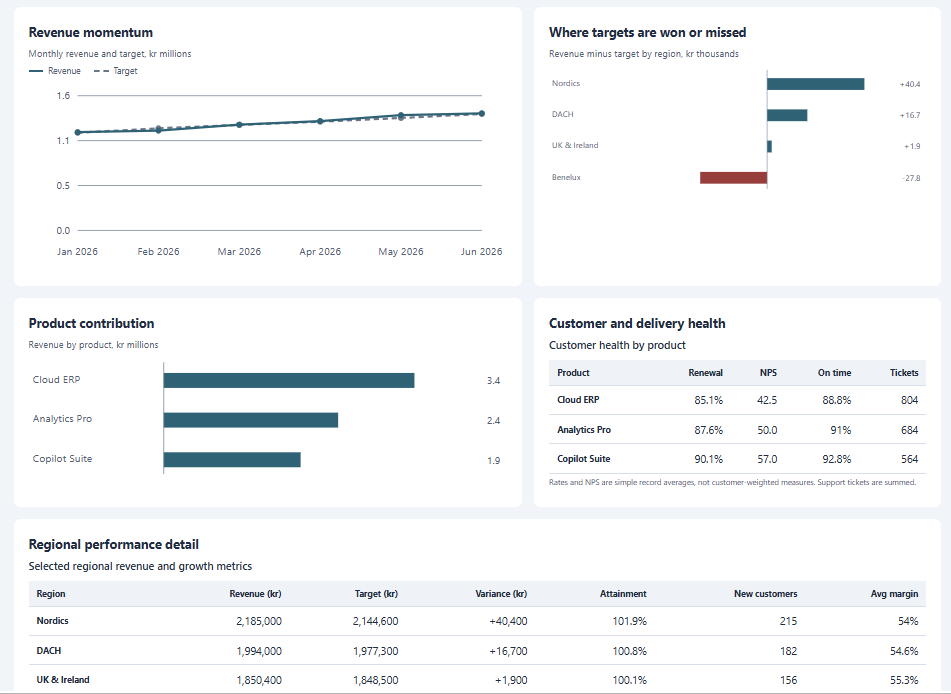
    <p>Scroll to the charts. There are three: revenue against target by month, revenue minus target by region, and revenue by product. Two tables follow: customer and delivery health, and regional detail.</p>

    <p><img src="/assets/images/in_posts/Office/xlsx-interactive-dashboard/05-excel-dashboard-charts-and-tables.png" alt="Dashboard charts and tables: revenue momentum, target gap by region, product contribution, customer health, and regional detail" /></p>
  </li>
  <li>Change one revenue value in Performance Data and watch the canvas. Microsoft says it updates as data changes. I did not run this test for this post.</li>
</ol>

<h2 id="what-is-intentionally-simple">What is intentionally simple</h2>

<ul>
  <li>One prompt. No layout, color, or metric definition in it.</li>
  <li>One synthetic workbook. No live BC connection, no refresh, no Edit in Excel.</li>
  <li>No named skill, no custom rules, no brand kit.</li>
  <li>No check of the dashboard on Excel for the web or on Mac.</li>
</ul>

<h2 id="risks-and-limits">Risks and limits</h2>

<ul>
  <li><strong>Verify the numbers.</strong> I checked the headline values against the source rows. Revenue is kr7,695,700, target is kr7,664,500, and new customers are 678. The 19.2% change from January to June also matches. Copilot labels it a first-to-last period comparison, which is not year-on-year growth.</li>
  <li><strong>Metric definitions differ.</strong> The margin card shows 54.9% and says “simple average across selected records”. Weighted by revenue, the same data gives 52.6%. The previous post used the weighted figure. The customer health table also uses simple record averages. Copilot states this under the table, so a customer-weighted view needs a new prompt.</li>
  <li><strong>Output varies.</strong> The prompt is open, so another run can give another layout or other insights.</li>
  <li><strong>Copilot changes the workbook.</strong> It added a sheet, and it says the source data is unchanged. Use <strong>Undo</strong> if you do not want the sheet.</li>
  <li><strong>Availability differs by source.</strong> The <a href="https://techcommunity.microsoft.com/blog/excelblog/beyond-analysis-copilot-gets-to-work-in-excel/4517581">Excel blog</a> says Insiders first. The <a href="https://mc.merill.net/message/MC1485411">Message Center post</a> planned worldwide rollout from mid-October to the end of October. The <a href="https://techcommunity.microsoft.com/blog/microsoft-copilot-blog/what%E2%80%99s-new-in-microsoft-copilot--october-2026/4568528">October Copilot update</a> says Insiders in October and worldwide in November. Check your own tenant.</li>
  <li><strong>Licensing.</strong> Copilot in Excel needs an eligible license, as the <a href="https://support.microsoft.com/en-us/excel/copilot/get-started-with-copilot-in-excel">Microsoft Support page</a> explains.</li>
  <li><strong>Not a governed report.</strong> BC permissions do not follow the exported data, so anyone with the file sees all rows in it.</li>
</ul>

<h2 id="next-iteration">Next iteration</h2>

<ul>
  <li>Test the refresh path: <strong>Edit in Excel</strong>, refresh in the add-in, and check if the canvas follows. Microsoft does not document this combination, so I treat it as untested.</li>
  <li>Name the metrics in the prompt, for example margin weighted by revenue.</li>
  <li>Compare the result with a Power BI report on the same BC data.</li>
</ul>

<h2 id="closing-note">Closing note</h2>

<p>One prompt gave a useful first dashboard. The margin card is the label that a person must still read. Treat the canvas as a fast draft for a known data set, not as a source of truth.</p>]]></content><author><name>Milos Baic</name></author><category term="Office-Reflections" /><category term="business-central" /><category term="copilot" /><category term="excel" /><category term="interactive-canvas" /><category term="dashboard" /><category term="open-in-excel" /><category term="ai" /><summary type="html"><![CDATA[A short, hands-on test of Copilot in Excel building an interactive dashboard from one prompt, framed as a Business Central reporting scenario, with notes on what to verify before you trust it.]]></summary></entry><entry><title type="html">PowerPoint Interactive Slides: An Executive Dashboard from an Excel Snapshot</title><link href="https://mbaic.github.io/2026/10/25/powerpoint-interactive-slides-copilot-executive-dashboard/" rel="alternate" type="text/html" title="PowerPoint Interactive Slides: An Executive Dashboard from an Excel Snapshot" /><published>2026-10-25T00:00:00+00:00</published><updated>2026-10-25T00:00:00+00:00</updated><id>https://mbaic.github.io/2026/10/25/powerpoint-interactive-slides-copilot-executive-dashboard</id><content type="html" xml:base="https://mbaic.github.io/2026/10/25/powerpoint-interactive-slides-copilot-executive-dashboard/"><![CDATA[<h1 id="powerpoint-interactive-slides-an-executive-dashboard-from-an-excel-snapshot">PowerPoint Interactive Slides: An Executive Dashboard from an Excel Snapshot</h1>

<div class="post-disclaimer">
  <p><strong>Note:</strong> This blog is a personal notebook. I write it to record what I work on, for my own reference, not to publish it on social media or to promote myself. If a post is still useful to you, I am glad, but that is not why it exists.</p>
  <p>This post was published on October 25, 2026. Software versions, product features, links, and tool availability may have changed since then. Always check official documentation for the latest information. Some screenshots show small details. Zoom in on the page to see them clearly.</p>
</div>

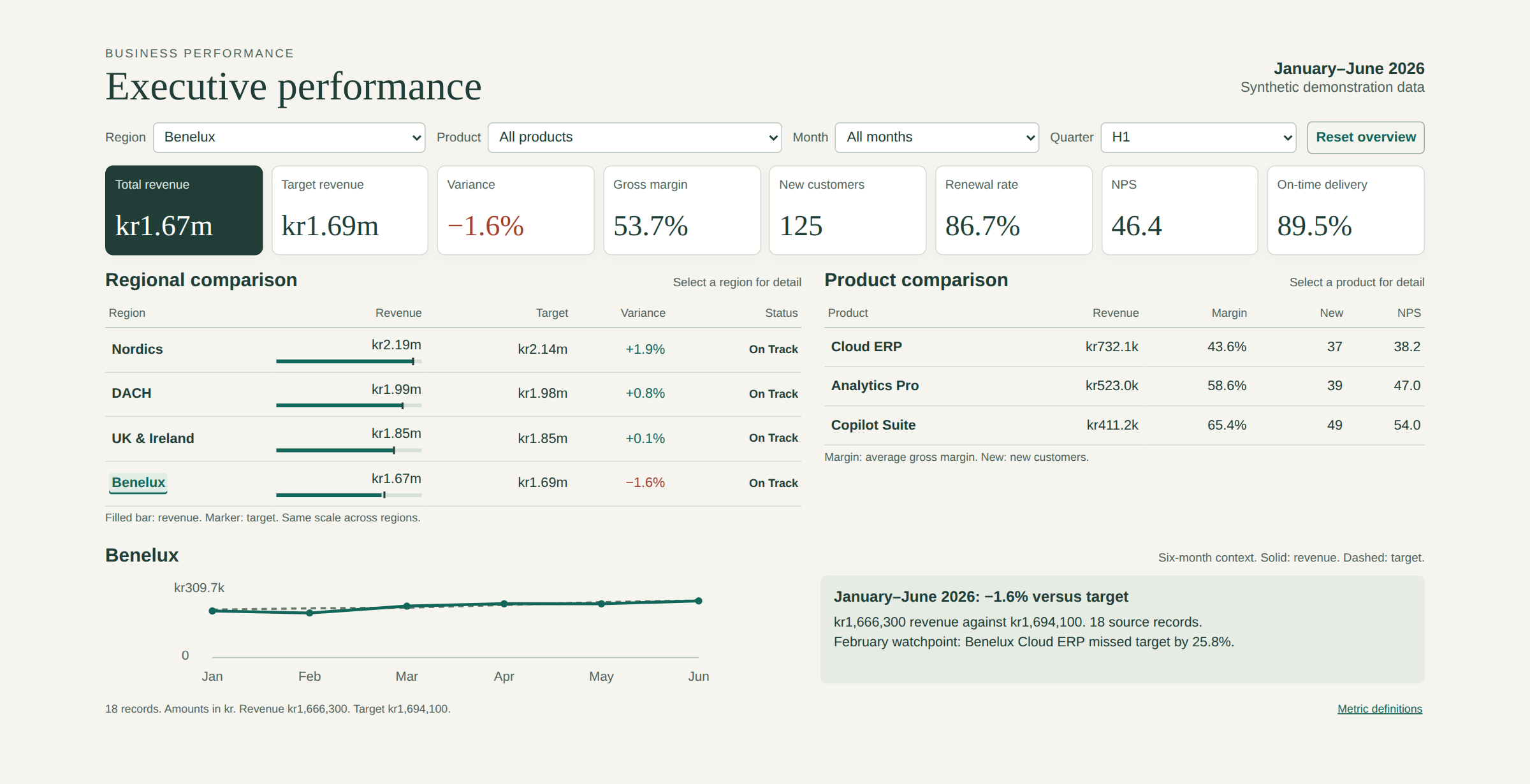
<p>Microsoft’s <a href="https://blogs.microsoft.com/blog/2026/09/25/introducing-the-new-copilot-with-home-code-and-autopilot/">new Copilot app</a> brings Word, Excel, and PowerPoint into one place, called Office in Copilot. The three apps also have Copilot built in, and their <a href="https://www.microsoft.com/en-us/copilot/blog/2026/04/22/copilots-agentic-capabilities-in-word-excel-and-powerpoint-are-generally-available/">agentic capabilities became generally available in April 2026</a>. This post tests one new PowerPoint skill, Create interactive slide, on a Business Central style sales review.</p>

<h2 id="problem">Problem</h2>

<p>Scenario: a finance or sales lead exports a Business Central list with <strong>Open in Excel</strong> and prepares a monthly review. The deck carries a static table. The first question from the room is often about one region or one product, and the answer sits in a backup slide or another file.</p>

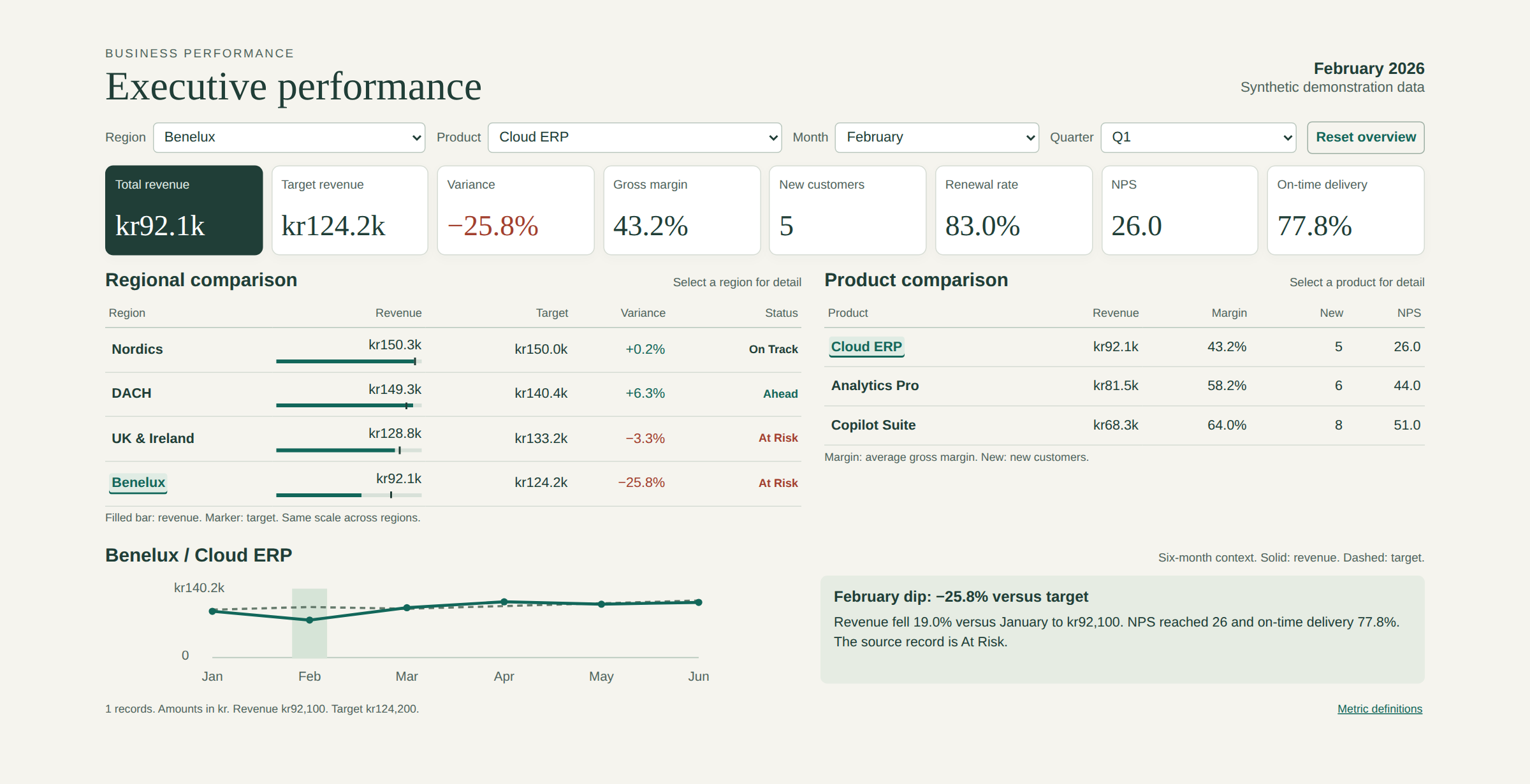
<p>A total can also hide an exception. In the demo data, all four regions finish the half year within 3% of target and show On Track. One record still stands out: Cloud ERP in Benelux missed its February target by 25.8%.</p>

<h2 id="why-this-matters">Why this matters</h2>

<p>An <a href="https://support.microsoft.com/en-us/powerpoint/copilot/create-interactive-slides-with-copilot-in-powerpoint">interactive slide</a> lets the presenter start with the overview and open detail only when someone asks. Microsoft describes this as <a href="https://techcommunity.microsoft.com/blog/microsoft-copilot-blog/transform-your-storytelling-with-interactive-slides-in-powerpoint/4564287">revealing information progressively</a>.</p>

<p>The cost is one prompt, and the trade-off is control. The slide is like a photo of the scoreboard at half-time: you can zoom in on any part, but the score in the photo never changes. It does not replace a governed, refreshable report in Power BI.</p>

<h2 id="architecture">Architecture</h2>

<p>Pattern: read-only and snapshot-based. Nothing writes back to Business Central.</p>

<table>
  <thead>
    <tr>
      <th>Layer</th>
      <th>Runs where</th>
      <th>Role in this demo</th>
    </tr>
  </thead>
  <tbody>
    <tr>
      <td>Business Central</td>
      <td>Inside BC</td>
      <td>Source of the data in a real case. Not used in the demo.</td>
    </tr>
    <tr>
      <td>Excel workbook</td>
      <td>Excel</td>
      <td>A formula-driven Dashboard sheet and a Performance Data sheet with 72 records.</td>
    </tr>
    <tr>
      <td>Copilot in PowerPoint</td>
      <td>Microsoft 365</td>
      <td>Reads the workbook and builds the slide.</td>
    </tr>
    <tr>
      <td>Interactive slide</td>
      <td>Inside the .pptx file</td>
      <td>One sandboxed web view that holds a copy of the data.</td>
    </tr>
  </tbody>
</table>

<p><strong>Assumption:</strong> the workbook has synthetic data and stands in for a Business Central export.</p>

<p>In a real case, <strong>Open in Excel</strong> on a list page exports the visible columns and <a href="https://learn.microsoft.com/en-us/dynamics365/business-central/across-work-with-excel">does not publish changes back</a>. The user needs the permission set D365 Excel Export Action or system permission 6110 (<a href="https://learn.microsoft.com/en-us/dynamics365/business-central/about-export-data">Learn export article</a>).</p>

<p>I opened the .pptx to check the data boundary. The slide is one embedded HTML block plus a fallback picture. The block holds all 72 records as JSON, with no external URL and no network call. Microsoft says the web views are <a href="https://support.microsoft.com/en-us/powerpoint/copilot/create-interactive-slides-with-copilot-in-powerpoint">sandboxed and do not connect to other content or services</a>. The slide is a copy of the data, so protect the deck like the export.</p>

<p>Copilot can also ground a slide in your own content through Work IQ. The <a href="https://www.microsoft.com/en-us/dynamics-365/blog/it-professional/2026/09/25/work-iq-business-and-workplace-intelligence-in-the-flow-of-work/">Work IQ announcement for Dynamics 365</a> lists Sales, Service, and Finance and Operations apps. It does not name Business Central, so I do not assume coverage.</p>

<h2 id="demo-steps">Demo steps</h2>

<p>Prerequisites: PowerPoint with Copilot on Windows, Mac, or web, and the Excel workbook. Microsoft says there is <a href="https://support.microsoft.com/en-us/powerpoint/copilot/create-interactive-slides-with-copilot-in-powerpoint">no separate license for interactive slides</a>. Rollout was due to finish by the end of October 2026.</p>

<ol>
  <li>
    <p>Open a blank deck. On the <strong>Home</strong> tab, select <strong>Interactive Slide</strong>. The Copilot pane opens.</p>

    <p><img src="/assets/images/in_posts/Office/pptx-interactive-slides/01-powerpoint-home-interactive-slide-button.png" alt="The Interactive Slide button in the Slides group on the PowerPoint Home tab" /></p>
  </li>
  <li>
    <p>Attach the workbook and send a prompt like this one:</p>

    <blockquote>
      <p>Create an interactive executive performance dashboard using the attached Excel workbook. Use the Dashboard and Performance Data sheets as the primary sources. Include: KPI cards for total revenue, target revenue, variance percentage, gross margin, new customers, renewal rate, NPS, and on-time delivery; interactive controls for region, product, month, and quarter; a regional comparison of revenue versus target and status; a product comparison of revenue, gross margin, new customers, and NPS; a highlight for the February dip for Cloud ERP in Benelux; a highlight for the May acceleration for Copilot Suite in the Nordics. Use progressive disclosure: start with the executive overview and reveal detail when the audience selects a region or product. Keep the design clean and professional.</p>
    </blockquote>
  </li>
  <li>
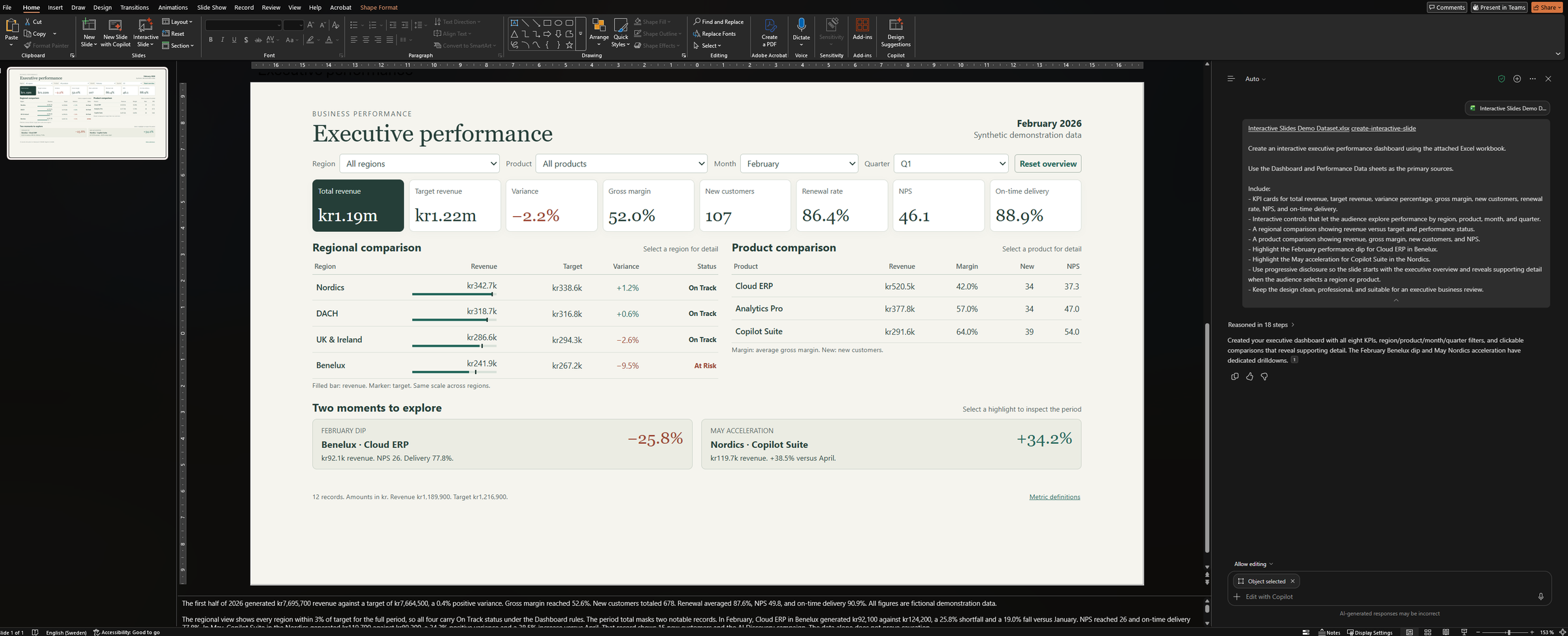
    <p>Wait for Copilot to finish. In my run, the result was one full-slide dashboard.</p>

    <p><img src="/assets/images/in_posts/Office/pptx-interactive-slides/02-powerpoint-copilot-result-slide.png" alt="PowerPoint with the generated Executive performance slide and the Copilot pane" /></p>
  </li>
  <li>
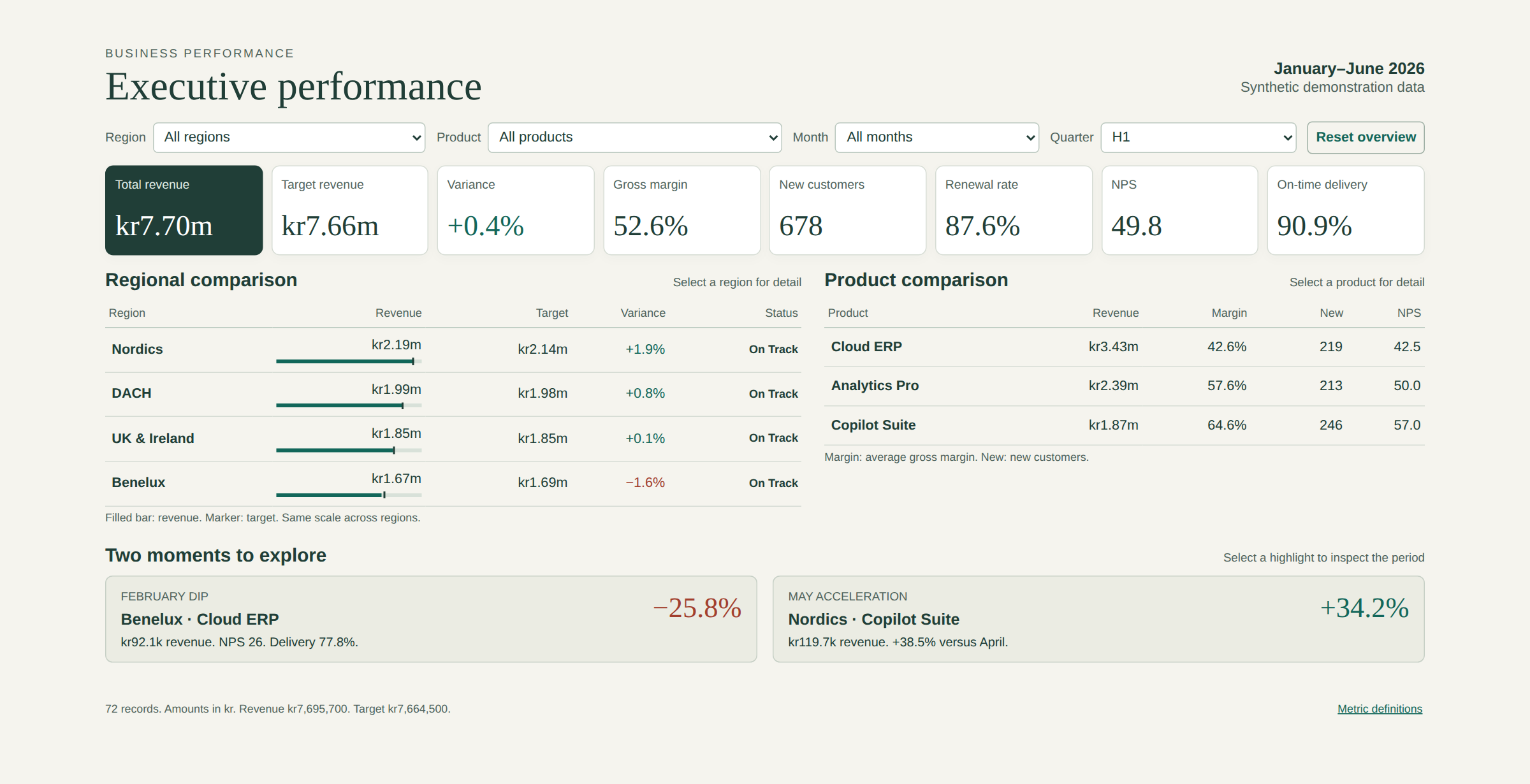
    <p>Start the slide show. The overview shows eight KPI cards, two comparison tables, and two highlights. If the slide opens in a filtered state, select <strong>Reset overview</strong>.</p>

    <p><img src="/assets/images/in_posts/Office/pptx-interactive-slides/03-interactive-slide-overview-h1.png" alt="The overview state for January to June 2026" /></p>
  </li>
  <li>
    <p>Select <strong>Benelux</strong> in the regional comparison. The KPI cards recalculate and a six-month trend appears. Benelux shows −1.6% and On Track, but the note names a February watchpoint.</p>

    <p><img src="/assets/images/in_posts/Office/pptx-interactive-slides/04-interactive-slide-benelux-drilldown.png" alt="Benelux selected, with the six-month revenue and target trend" /></p>
  </li>
  <li>
    <p>Select <strong>February dip</strong>. The slide shows kr92,100 against kr124,200 (−25.8%), NPS 26, and on-time delivery 77.8%.</p>

    <p><img src="/assets/images/in_posts/Office/pptx-interactive-slides/05-interactive-slide-february-dip.png" alt="The February dip for Cloud ERP in Benelux" /></p>
  </li>
  <li>
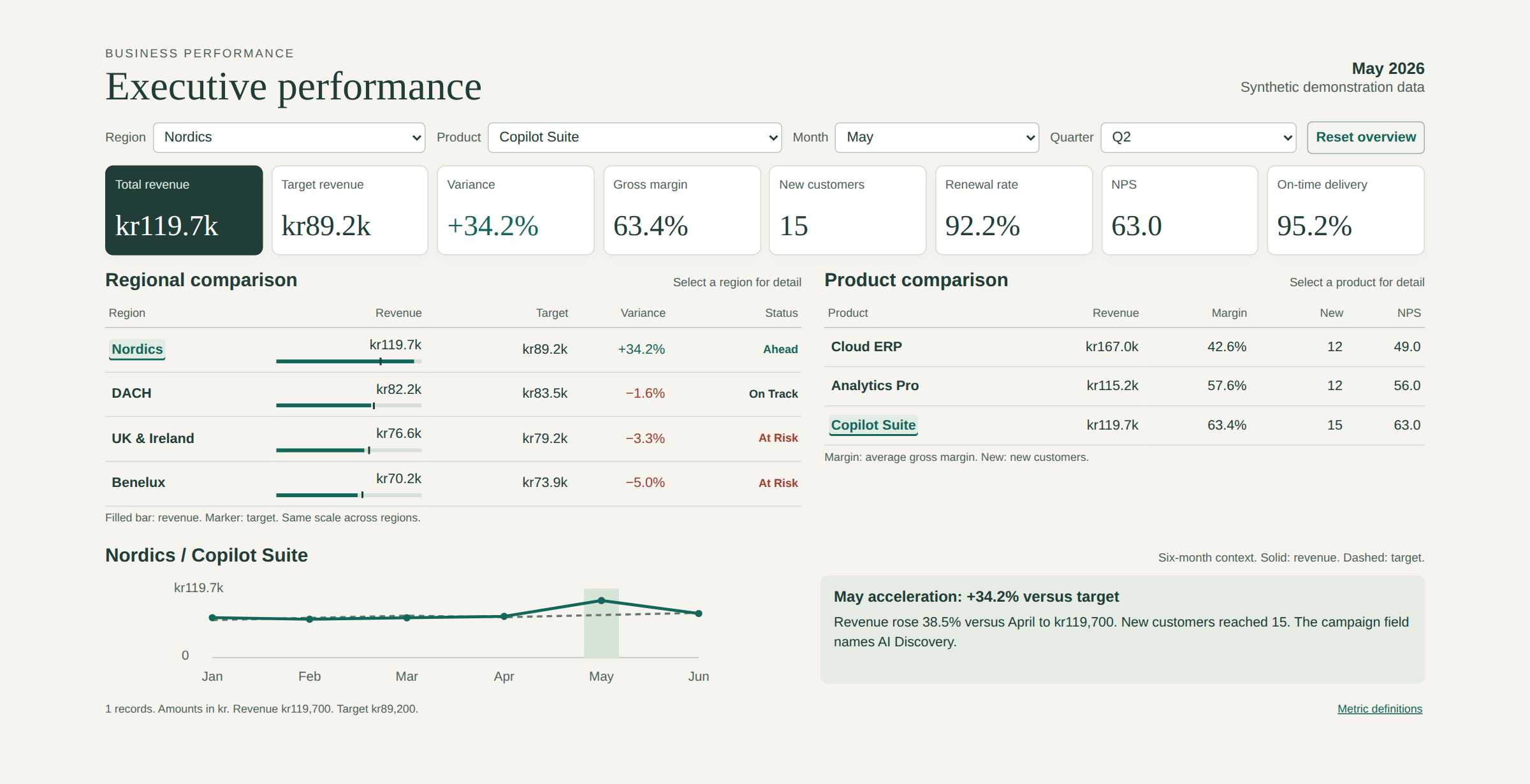
    <p>Select <strong>May acceleration</strong>. The slide shows kr119,700 against kr89,200 (+34.2%), 38.5% above April, and 15 new customers.</p>

    <p><img src="/assets/images/in_posts/Office/pptx-interactive-slides/06-interactive-slide-may-acceleration.png" alt="The May acceleration for Copilot Suite in the Nordics" /></p>
  </li>
  <li>
    <p>Verify. Select <strong>Reset overview</strong> and compare the cards with the workbook: revenue kr7,695,700, target kr7,664,500, variance +0.4%, and 678 new customers.</p>
  </li>
</ol>

<p>Screenshots 03 to 06 show the slide’s embedded HTML in a desktop browser, so fonts differ slightly from PowerPoint.</p>

<h2 id="what-is-intentionally-simple">What is intentionally simple</h2>

<ul>
  <li>One slide, one workbook, one prompt.</li>
  <li>Synthetic data, default styling, and no brand kit.</li>
  <li>The Timeline sheet in the workbook stays unused.</li>
  <li>No test in Teams, on a phone, or with a screen reader.</li>
</ul>

<h2 id="risks-and-limits">Risks and limits</h2>

<ul>
  <li>Copilot generates the layout, content, and behavior, and Microsoft tells you to <a href="https://support.microsoft.com/en-us/powerpoint/copilot/create-interactive-slides-with-copilot-in-powerpoint">review the result before you present</a>. The slide’s own notes warn that the data alone does not prove why May rose. The “AI Discovery” campaign is only a field in the workbook.</li>
  <li>You cannot edit the slide directly. You change it with another prompt. A <a href="https://techcommunity.microsoft.com/blog/microsoft-copilot-blog/transform-your-storytelling-with-interactive-slides-in-powerpoint/4564287">reader comment</a> on Microsoft’s announcement reports that an update can change more than you asked, so check the whole slide after each change.</li>
  <li>The data does not refresh from Business Central or from Excel.</li>
  <li>Print and PDF export show a non-interactive image. Interaction is not available on iPhone or Android. On Mac, you can interact in slide show view but not in presenter view.</li>
  <li>In PowerPoint Live in Teams, each attendee interacts alone and does not see the presenter’s clicks.</li>
</ul>

<h2 id="next-iteration">Next iteration</h2>

<ul>
  <li>Repeat the test with a real <strong>Open in Excel</strong> export from a sandbox with the CRONUS demo company.</li>
  <li>Test keyboard navigation (Tab and Esc) and Teams presenting before a real executive review.</li>
  <li>Add a checklist that compares each KPI card with the source workbook.</li>
  <li>Re-check Work IQ coverage when Microsoft states whether it includes Business Central.</li>
</ul>

<h2 id="closing-note">Closing note</h2>

<p>An interactive slide is a good way to present a snapshot, with no connection to Business Central. Treat the deck like the Excel export it came from, and check every number before the meeting.</p>]]></content><author><name>Milos Baic</name></author><category term="Office-Reflections" /><category term="business-central" /><category term="copilot" /><category term="powerpoint" /><category term="excel" /><category term="interactive-slides" /><category term="work-iq" /><category term="ai" /><summary type="html"><![CDATA[A short, hands-on test of the Copilot skill that builds an interactive executive dashboard in PowerPoint from an Excel workbook, framed as a Business Central reporting scenario.]]></summary></entry><entry><title type="html">Business Central MCP Server: Read-Only Analysis with Data Query Tools</title><link href="https://mbaic.github.io/2026/10/17/bc-mcp-server-read-only-analysis-with-data-query-tools/" rel="alternate" type="text/html" title="Business Central MCP Server: Read-Only Analysis with Data Query Tools" /><published>2026-10-17T00:00:00+00:00</published><updated>2026-10-17T00:00:00+00:00</updated><id>https://mbaic.github.io/2026/10/17/bc-mcp-server-read-only-analysis-with-data-query-tools</id><content type="html" xml:base="https://mbaic.github.io/2026/10/17/bc-mcp-server-read-only-analysis-with-data-query-tools/"><![CDATA[<h1 id="business-central-mcp-server-read-only-analysis-with-data-query-tools">Business Central MCP Server: Read-Only Analysis with Data Query Tools</h1>

<div class="post-disclaimer">
  <p><strong>Note:</strong> This blog is a personal notebook. I write it to record what I work on, for my own reference, not to publish it on social media or to promote myself. If a post is still useful to you, I am glad, but that is not why it exists.</p>
  <p>This post was published on October 17, 2026. Software versions, product features, links, and tool availability may have changed since then. Always check official documentation for the latest information. Some screenshots show small details. Zoom in on the page to see them clearly.</p>
</div>

<h2 id="problem">Problem</h2>

<p>A user wants to analyse customers and open sales orders without a prepared API dataset. Microsoft’s <a href="https://youtu.be/q3xnjJD32kk?is=ikqixeTtqI5wfwg3">release wave 2 session</a> shows an agent that writes AL queries for this purpose.</p>

<h2 id="why-this-matters">Why this matters</h2>

<p>API tools work like a vending machine: the agent gets only what an administrator loaded. Data query tools work like a self-service store: the agent can read every table that the signed-in user can read. (<a href="https://youtu.be/q3xnjJD32kk?is=ikqixeTtqI5wfwg3">Microsoft session</a>) A short Available APIs list does not limit this path. Review the user’s permissions before you enable it.</p>

<h2 id="architecture">Architecture</h2>

<p>This pattern is read-only. (<a href="https://learn.microsoft.com/en-us/dynamics365/business-central/dev-itpro/ai/configure-mcp-server">Microsoft configuration guidance</a>) The external host coordinates the analysis. Business Central compiles and runs the AL queries, then returns the rows to that host. (<a href="https://youtu.be/q3xnjJD32kk?is=ikqixeTtqI5wfwg3">Microsoft session</a>)</p>

<table>
  <thead>
    <tr>
      <th>Tool</th>
      <th>Purpose</th>
    </tr>
  </thead>
  <tbody>
    <tr>
      <td><code class="language-plaintext highlighter-rouge">bc_data_find_tables</code></td>
      <td>Find tables. (<a href="https://learn.microsoft.com/en-us/dynamics365/business-central/dev-itpro/ai/configure-mcp-server">Microsoft Learn</a>)</td>
    </tr>
    <tr>
      <td><code class="language-plaintext highlighter-rouge">bc_data_get_table_schema</code></td>
      <td>Inspect fields. (<a href="https://learn.microsoft.com/en-us/dynamics365/business-central/dev-itpro/ai/configure-mcp-server">Microsoft Learn</a>)</td>
    </tr>
    <tr>
      <td><code class="language-plaintext highlighter-rouge">bc_data_get_table_relations</code></td>
      <td>Find join paths. (<a href="https://learn.microsoft.com/en-us/dynamics365/business-central/dev-itpro/ai/configure-mcp-server">Microsoft Learn</a>)</td>
    </tr>
    <tr>
      <td><code class="language-plaintext highlighter-rouge">bc_data_query</code></td>
      <td>Validate AL queries; <code class="language-plaintext highlighter-rouge">returnData=true</code> also executes them. (<a href="https://learn.microsoft.com/en-us/dynamics365/business-central/dev-itpro/ai/configure-mcp-server">Microsoft Learn</a>)</td>
    </tr>
  </tbody>
</table>

<p>The agent can correct a query from the compiler errors. In the demo, a separate documentation MCP connection gives it AL guidance. Server Features are now separate from Available APIs, and System Tools shows the enabled tools. (<a href="https://youtu.be/q3xnjJD32kk?is=ikqixeTtqI5wfwg3">Microsoft session</a>)</p>

<h2 id="demo-steps">Demo steps</h2>

<p>I have not run this proposed test myself. Assumption: the preview is available in your Business Central online sandbox.</p>

<ol>
  <li><strong>Configure:</strong> With <code class="language-plaintext highlighter-rouge">MCP - Admin</code> or equivalent permissions, create an inactive configuration named <code class="language-plaintext highlighter-rouge">SandboxOrderAnalysis</code>. (<a href="https://learn.microsoft.com/en-us/dynamics365/business-central/dev-itpro/ai/configure-mcp-server">Microsoft configuration guidance</a>)</li>
  <li><strong>Enable:</strong> Turn on Data Query Tools (Preview). Leave API Tools disabled and Unblock Edit Tools off. Then validate and activate the configuration. (<a href="https://learn.microsoft.com/en-us/dynamics365/business-central/dev-itpro/ai/configure-mcp-server">Microsoft configuration guidance</a>)</li>
  <li><strong>Connect:</strong> In Copilot Studio, add the Dynamics 365 Business Central MCP Server and sign in with a limited-permission test user. Set Environment, Company, and MCP Server Configuration to the sandbox and <code class="language-plaintext highlighter-rouge">SandboxOrderAnalysis</code>. (<a href="https://learn.microsoft.com/en-us/dynamics365/business-central/dev-itpro/ai/create-agent-in-copilot-studio">Microsoft connection guidance</a>)</li>
  <li><strong>Ask:</strong> Use this prompt:</li>
</ol>

<div class="language-text highlighter-rouge"><div class="highlight"><pre class="highlight"><code>Analyse open sales orders for one selected customer.
Ask for an order-date range.
Inspect schemas and relations before querying.
Group quantities by item number and unit of measure.
Show the AL query, filters, and result limits.
Do not change records.
</code></pre></div></div>

<p>Compare the results with filtered sales orders in Business Central. Confirm that a read outside the user’s permissions fails.</p>

<p>The session also shows an MCP server toggle on Copilot &amp; agent capabilities. (<a href="https://youtu.be/q3xnjJD32kk?is=ikqixeTtqI5wfwg3">Microsoft session</a>) Disable it in the sandbox, confirm that new calls fail, then enable it again.</p>

<h2 id="what-is-intentionally-simple">What is intentionally simple</h2>

<p>The test uses one customer, one company, and one date range, with no custom AL extension and no write-back.</p>

<h2 id="riskslimits">Risks/limits</h2>

<p>AL queries have limits on execution time and returned data. (<a href="https://youtu.be/q3xnjJD32kk?is=ikqixeTtqI5wfwg3">Microsoft session</a>) Check the agent’s joins and filters, and review how the host handles returned data.</p>

<p>Data Query Tools are still in preview. Microsoft plans charges for MCP tools, but the cited guidance has no pricing or rollout details. (<a href="https://learn.microsoft.com/en-us/dynamics365/business-central/dev-itpro/ai/configure-mcp-server">Microsoft configuration guidance</a>; <a href="https://www.learn.microsoft.com/en-us/dynamics365/business-central/dev-itpro/ai/mcp-overview">Microsoft MCP overview</a>) Check the current terms before production use.</p>

<h2 id="next-iteration">Next iteration</h2>

<p>Keep the expected totals as a test case. Repeat the permission checks before you expand access.</p>

<h2 id="closing-note">Closing note</h2>

<p>I would use this path for exploration. For repeated reporting, I would prefer a reviewed dataset with an agreed definition.</p>]]></content><author><name>Milos Baic</name></author><category term="BC MCP-Reflections" /><category term="business-central" /><category term="al" /><category term="architecture" /><category term="copilot" /><category term="agents" /><category term="mcp" /><category term="power-platform" /><category term="azure" /><summary type="html"><![CDATA[A proposed sandbox test of the preview Data Query Tools in the Business Central MCP Server, with the permission boundary and the configuration controls explained.]]></summary></entry><entry><title type="html">From Prompt to Interactive Demo: A Business Central Delivery Guide Built with Perplexity Computer</title><link href="https://mbaic.github.io/2026/10/13/perplexity-computer-interactive-bc-delivery-guide/" rel="alternate" type="text/html" title="From Prompt to Interactive Demo: A Business Central Delivery Guide Built with Perplexity Computer" /><published>2026-10-13T00:00:00+00:00</published><updated>2026-10-13T00:00:00+00:00</updated><id>https://mbaic.github.io/2026/10/13/perplexity-computer-interactive-bc-delivery-guide</id><content type="html" xml:base="https://mbaic.github.io/2026/10/13/perplexity-computer-interactive-bc-delivery-guide/"><![CDATA[<h1 id="from-prompt-to-interactive-demo-a-business-central-delivery-guide-built-with-perplexity-computer">From Prompt to Interactive Demo: A Business Central Delivery Guide Built with Perplexity Computer</h1>

<div class="post-disclaimer">
  <p><strong>Note:</strong> This blog is a personal notebook. I write it to record what I work on, for my own reference, not to publish it on social media or to promote myself. If a post is still useful to you, I am glad, but that is not why it exists.</p>
  <p>This post was published on October 13, 2026. Software versions, product features, links, and tool availability may have changed since then. Always check official documentation for the latest information. Some screenshots show small details. Zoom in on the page to see them clearly.</p>
</div>

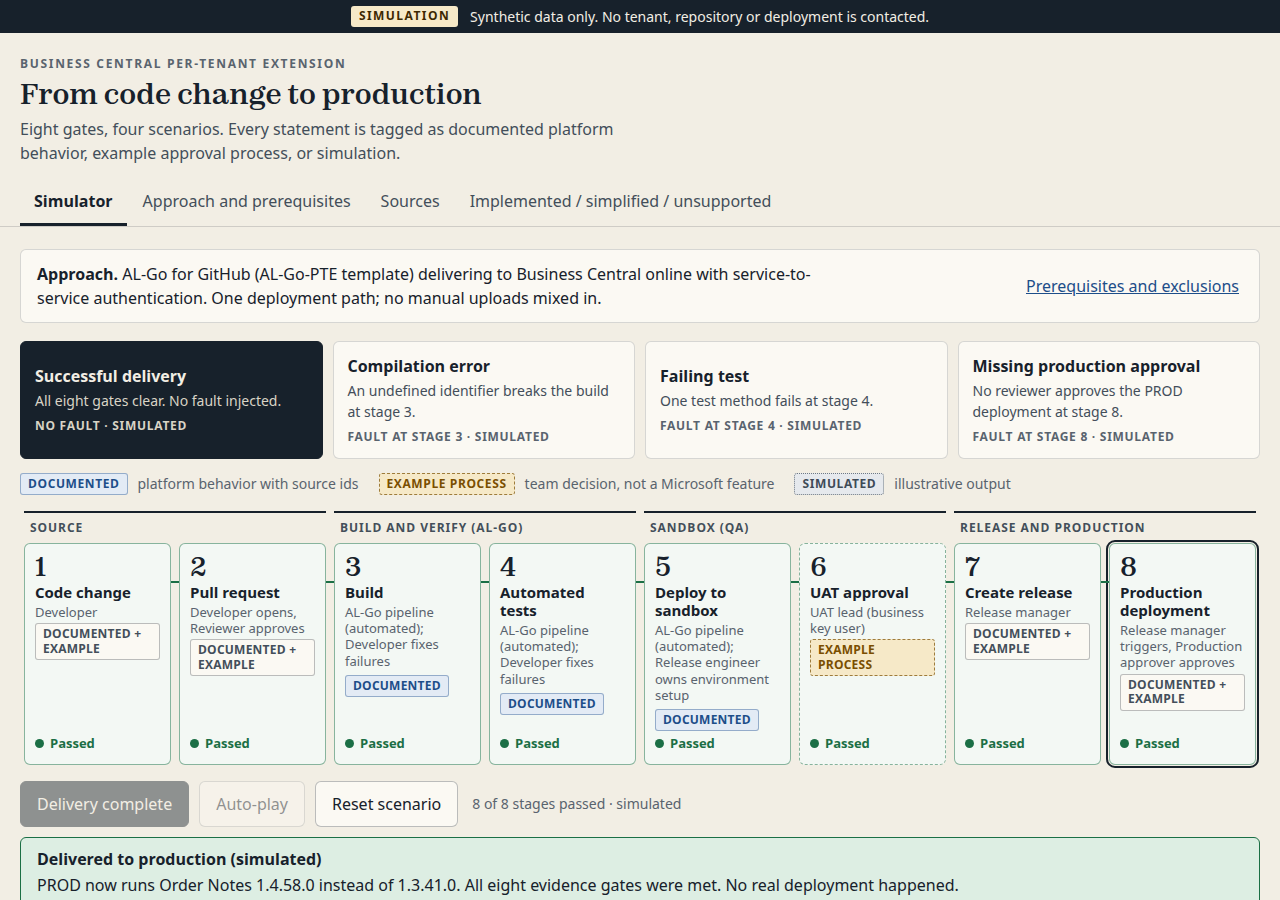
<p>I often explain to junior and new colleagues how a requested change gets from a meeting to production, usually on a whiteboard. This time, Perplexity Computer built two small interactive web apps that explain the flow. Both are below, recorded in auto-play.</p>

<h2 id="problem">Problem</h2>

<p>Delivery of a per-tenant extension (PTE) has many steps: user story, AL code, pull request, build, tests, sandbox, user acceptance testing (UAT), and production. Customers do not need that detail. They need to see a controlled path, and where their own team approves the change.</p>

<p>A static slide does not show that path well. A live AL-Go demo needs a real repository and a real tenant. That is too much setup and too much risk for a ten-minute customer call.</p>

<h2 id="why-this-matters">Why this matters</h2>

<p>A customer who understands the flow asks better questions. They plan time for UAT, name a business owner for sign-off, and accept that production comes after approval.</p>

<p>I also wanted to test if an AI agent can turn documentation into a useful teaching tool.</p>

<h2 id="architecture">Architecture</h2>

<p><a href="https://www.perplexity.ai/hub/blog/introducing-perplexity-computer">Perplexity Computer</a> is a Perplexity agent that plans and runs complete workflows. You describe an outcome, and it splits the work into tasks for sub-agents. Each task runs in an isolated environment with a filesystem, a browser, and tool integrations. Perplexity states that this environment is a <a href="https://www.perplexity.ai/hub/blog/how-we-built-security-into-computer">Firecracker microVM sandbox</a>. According to the <a href="https://www.perplexity.ai/help-center/en/articles/13837784-what-is-computer">Perplexity Help Center</a>, Computer can create functioning apps and is available on paid plans.</p>

<p>For this experiment, the boundaries are simple:</p>

<table>
  <thead>
    <tr>
      <th>Part</th>
      <th>Where it runs</th>
      <th>Connection to Business Central</th>
    </tr>
  </thead>
  <tbody>
    <tr>
      <td>Research</td>
      <td>Computer, using Microsoft Learn and the <a href="https://github.com/microsoft/AL-Go">microsoft/AL-Go</a> repository as the only sources</td>
      <td>None</td>
    </tr>
    <tr>
      <td>Build and test</td>
      <td>Computer’s sandbox: HTML, CSS, and JavaScript, tested in a headless browser</td>
      <td>None</td>
    </tr>
    <tr>
      <td>Output</td>
      <td>A static web app with synthetic data</td>
      <td>None</td>
    </tr>
  </tbody>
</table>

<p>The pattern is read-only, and only for public documentation. The agent does not read, suggest, approve, or write back anything in Business Central.</p>

<h2 id="demo-steps">Demo steps</h2>

<p>The idea came from a prompt for an interactive 3D assembly guide for an IKEA chair. I asked Perplexity for similar ideas that fit my work. The best one replaced the chair with software delivery: the same step-by-step guide, but for a change request.</p>

<p><strong>Step 1: The technical simulator.</strong> My first prompt asked for an interactive guide to deliver an AL PTE from code change to production, with three main rules:</p>

<ul>
  <li>Use only Microsoft Learn and the AL-Go repository for technical claims.</li>
  <li>Identify one delivery approach and do not mix incompatible ones.</li>
  <li>Use synthetic data and label every simulation.</li>
</ul>

<p>Computer chose AL-Go for GitHub with the AL-Go-PTE template, Business Central online, and service-to-service authentication. It picked 2D over 3D to keep inputs, outputs, and roles easy to read. It also added a Create Release stage before production, because the AL-Go Publish To Environment workflow deploys the <a href="https://github.com/microsoft/AL-Go/blob/main/Workshop/PublishToProduction.md">current release</a> by default. AL-Go also skips production environments in continuous deployment, unless you enable it. Every statement in the app is tagged as documented, example process, or simulated.</p>

<video controls="" muted="" playsinline="" preload="metadata" width="100%" poster="/assets/images/in_posts/2026-10-13-perplexity-computer-artifacts/sim-start.png">
  <source src="/assets/images/in_posts/2026-10-13-perplexity-computer-artifacts/sim-autoplay.mp4" type="video/mp4" />
  Your browser cannot play this video. See the screenshot below.
</video>

<p><img src="/assets/images/in_posts/2026-10-13-perplexity-computer-artifacts/sim-01-delivered.png" alt="Technical simulator after a successful run: eight stages from code change to production deployment, all passed, with documented, example process, and simulated labels" /></p>

<p>The simulator also has three failure scenarios for developers: a compilation error, a failing test, and a missing production approval.</p>

<p><strong>Step 2: The customer showcase.</strong> I asked Computer for a second app with one fictional story (“Add a delivery instruction field to a sales order”), five stages in plain language, and only the happy path. Internal testing, customer approval, and production release had to stay separate stages.</p>

<p><strong>Step 3: Auto-play and substeps.</strong> The last prompt added auto-play and 12 substeps with professional terms, from the requirements meeting to UAT sign-off, release, and production deployment. An environment strip shows where the change is: Development, UAT, or Production. One run takes about one minute.</p>

<video controls="" muted="" playsinline="" preload="metadata" width="100%" poster="/assets/images/in_posts/2026-10-13-perplexity-computer-artifacts/v2-01-start.png">
  <source src="/assets/images/in_posts/2026-10-13-perplexity-computer-artifacts/v2-autoplay.mp4" type="video/mp4" />
  Your browser cannot play this video. See the screenshots below.
</video>

<p><img src="/assets/images/in_posts/2026-10-13-perplexity-computer-artifacts/v2-02-uat.png" alt="Customer showcase at stage 4, Try it and approve: the sample sales order shows the new delivery instruction field in the UAT sandbox" /></p>

<p><img src="/assets/images/in_posts/2026-10-13-perplexity-computer-artifacts/v2-03-summary.png" alt="Customer showcase summary: five completed stages under the line From your idea to an improvement your team can use" /></p>

<p>Each prompt ended with a completion rule: test the controls, check desktop and mobile layouts, and report what could not be verified. Computer reported, for example, that it tested only in desktop Chromium, not on real phones.</p>

<h2 id="what-is-intentionally-simple">What is intentionally simple</h2>

<ul>
  <li>Three prompts and one fictional change on one sales order.</li>
  <li>Static HTML, CSS, and JavaScript. No backend, and no connection to Business Central or GitHub.</li>
  <li>The roles, the meeting, the user story format, and the UAT sign-off are example process. They are not a Microsoft-mandated workflow, and the showcase says so in its “About this demo” dialog.</li>
</ul>

<h2 id="riskslimits">Risks/limits</h2>

<ul>
  <li>The apps explain a process. They do not prove that your pipeline works. Check your own AL-Go settings and environments before you show them as “how we deliver”.</li>
  <li>Source rules reduce errors but do not remove them. In the first run, Computer flagged that Microsoft Learn marks the automation API <a href="https://learn.microsoft.com/en-us/dynamics365/business-central/dev-itpro/administration/resources/dynamics_extensionupload">extensionUpload endpoint</a> as deprecated, and Microsoft plans to remove it in 2027 release wave 1. Computer could not confirm from its sources whether AL-Go still uses it. That is the right behavior, but you must still check it.</li>
  <li>The v2 showcase uses technical terms such as “pull request” and “CI/CD workflow” again. I asked for that, but it makes the showcase less suitable for a fully non-technical audience.</li>
</ul>

<h2 id="next-iteration">Next iteration</h2>

<ul>
  <li>Publish the showcase as a page on this site and link to it from proposals.</li>
  <li>Make a plain-language version of the substeps for business users, with the technical terms in a toggle.</li>
</ul>

<h2 id="closing-note">Closing note</h2>

<p>The prompt rules did most of the work: one approach, named sources, synthetic data, and a clear completion check. Three short prompts then gave me one demo for developers and one for customers. I would still review every claim before a customer sees either.</p>]]></content><author><name>Milos Baic</name></author><category term="AI-Reflections" /><category term="business-central" /><category term="al" /><category term="al-go" /><category term="perplexity" /><category term="ai-agents" /><category term="devops" /><summary type="html"><![CDATA[What Perplexity Computer is, and how three short prompts turned into two runnable Business Central delivery demos: a technical AL-Go simulator and a customer showcase with auto-play.]]></summary></entry><entry><title type="html">VS Code Agents Window: Manage Agent Sessions in One Place</title><link href="https://mbaic.github.io/2026/09/13/vscode-agents-window/" rel="alternate" type="text/html" title="VS Code Agents Window: Manage Agent Sessions in One Place" /><published>2026-09-13T00:00:00+00:00</published><updated>2026-09-13T00:00:00+00:00</updated><id>https://mbaic.github.io/2026/09/13/vscode-agents-window</id><content type="html" xml:base="https://mbaic.github.io/2026/09/13/vscode-agents-window/"><![CDATA[<h1 id="vs-code-agents-window-manage-agent-sessions-in-one-place">VS Code Agents Window: Manage Agent Sessions in One Place</h1>

<div class="post-disclaimer">
  <p><strong>Note:</strong> This blog is a personal notebook. I write it to record what I work on, for my own reference, not to publish it on social media or to promote myself. If a post is still useful to you, I am glad, but that is not why it exists.</p>
  <p>This post was published on September 13, 2026. Software versions, product features, links, and tool availability may have changed since then. Always check official documentation for the latest information. Some screenshots show small details. Zoom in on the page to see them clearly.</p>
</div>

<p>The <a href="https://code.visualstudio.com/docs/agents/run/agents-window">Agents window</a> is a separate Visual Studio Code window for agent work. You give tasks to agents there, watch them run, and review the results. You still write code in the normal editor window.</p>

<p>Think of a parcel tracking page. One page shows every parcel: in transit, waiting for a signature, or delivered. The Agents window does the same for agent sessions.</p>

<p>This post shows it with two AL projects, an app and its test app. It also shows where canvases fit in.</p>

<h2 id="problem">Problem</h2>

<p>A Business Central extension often has more than one AL project, for example an app and its test app in separate repositories.</p>

<p>Suppose you give one agent task to each project. In the Chat view, each task stays in its own editor window. You switch windows to see which agent waits for an approval and what each agent changed.</p>

<h2 id="why-this-matters">Why this matters</h2>

<p>A fast agent makes the reviewer the slow part. With agent work spread across windows, a reviewer can miss a changed file or a waiting agent. That change can then reach a pull request, a sandbox, or a release without review.</p>

<p>The Agents window lists all sessions in one sidebar: running, waiting for you, or finished. You review the changes of each session before you commit them.</p>

<h2 id="architecture">Architecture</h2>

<p>The Agents window uses a few terms.</p>

<table>
  <thead>
    <tr>
      <th>Term</th>
      <th>Meaning</th>
    </tr>
  </thead>
  <tbody>
    <tr>
      <td>Session</td>
      <td>The unit of work with an agent. It holds the workspace, the code changes, and one or more chats for one task.</td>
    </tr>
    <tr>
      <td>Chat</td>
      <td>One conversation inside a session. Chats in the same session share the workspace and can edit the same files.</td>
    </tr>
    <tr>
      <td>Harness</td>
      <td>The agent runtime that runs a session, for example Copilot, Claude, or Codex.</td>
    </tr>
    <tr>
      <td>Agent Host</td>
      <td>A background process that runs harnesses and owns their sessions. The Chat view and the Agents window both connect to it.</td>
    </tr>
    <tr>
      <td>Worktree</td>
      <td>A second working folder for the same Git repository, on its own branch. The agent changes files there, not in your open folder.</td>
    </tr>
  </tbody>
</table>

<p>The Agent Host owns the session, and each window only shows it. You can start a Copilot or Claude session in the Chat view and continue it in the Agents window, with no new session and no forked chat. Sessions on the older Local harness run only in the Chat view. <a href="https://code.visualstudio.com/docs/agents/concepts/sessions">Sessions and chats</a></p>

<p>An active turn can continue after you close the project window, if VS Code itself stays open. <a href="https://code.visualstudio.com/docs/agents/concepts/agent-host">Agent Host architecture</a></p>

<p>Each session runs in one workspace: the first folder or repository that you select. Other folders, issues, or pull requests can be attached as context. Multi-root sessions are not supported yet, so an AL team with a multi-root <code class="language-plaintext highlighter-rouge">.code-workspace</code> file starts one session for each project.</p>

<p>This is the flow of one session:</p>

<div style="margin: 1.75rem 0 2rem 0;">
<div style="display:flex; align-items:flex-start; gap:1rem;">
<div style="flex:0 0 36px; width:36px; height:36px; border-radius:50%; background:#00B7C3; color:#ffffff; display:flex; align-items:center; justify-content:center; font-weight:700; box-shadow:0 4px 12px rgba(0,183,195,0.35);">1</div>
<div style="flex:1 1 auto; background:#E8F4F6; border-radius:8px; padding:0.85rem 1.1rem; box-shadow:0 2px 10px rgba(0,183,195,0.18);">
<div style="font-weight:700; color:#3D4B5C; font-size:1.02rem;">Choose the workspace</div>
<div style="color:#3D4B5C; opacity:0.85; margin-top:0.2rem; font-size:0.92rem;">You select one AL project folder or repository for the session.</div>
</div>
</div>
<div style="padding-left:17px;"><div style="width:2px; height:26px; background:#00B7C3; opacity:0.45;"></div></div>
<div style="display:flex; align-items:flex-start; gap:1rem;">
<div style="flex:0 0 36px; width:36px; height:36px; border-radius:50%; background:#00B7C3; color:#ffffff; display:flex; align-items:center; justify-content:center; font-weight:700; box-shadow:0 4px 12px rgba(0,183,195,0.35);">2</div>
<div style="flex:1 1 auto; background:#E8F4F6; border-radius:8px; padding:0.85rem 1.1rem; box-shadow:0 2px 10px rgba(0,183,195,0.18);">
<div style="font-weight:700; color:#3D4B5C; font-size:1.02rem;">Choose the isolation</div>
<div style="color:#3D4B5C; opacity:0.85; margin-top:0.2rem; font-size:0.92rem;">You select a new worktree, or you let the agent edit the folder directly.</div>
</div>
</div>
<div style="padding-left:17px;"><div style="width:2px; height:26px; background:#00B7C3; opacity:0.45;"></div></div>
<div style="display:flex; align-items:flex-start; gap:1rem;">
<div style="flex:0 0 36px; width:36px; height:36px; border-radius:50%; background:#00B7C3; color:#ffffff; display:flex; align-items:center; justify-content:center; font-weight:700; box-shadow:0 4px 12px rgba(0,183,195,0.35);">3</div>
<div style="flex:1 1 auto; background:#E8F4F6; border-radius:8px; padding:0.85rem 1.1rem; box-shadow:0 2px 10px rgba(0,183,195,0.18);">
<div style="font-weight:700; color:#3D4B5C; font-size:1.02rem;">The agent works in the background</div>
<div style="color:#3D4B5C; opacity:0.85; margin-top:0.2rem; font-size:0.92rem;">The Agent Host runs the session while you start or check other sessions.</div>
</div>
</div>
<div style="padding-left:17px;"><div style="width:2px; height:26px; background:#00B7C3; opacity:0.45;"></div></div>
<div style="display:flex; align-items:flex-start; gap:1rem;">
<div style="flex:0 0 36px; width:36px; height:36px; border-radius:50%; background:#00B7C3; color:#ffffff; display:flex; align-items:center; justify-content:center; font-weight:700; box-shadow:0 4px 12px rgba(0,183,195,0.35);">4</div>
<div style="flex:1 1 auto; background:#E8F4F6; border-radius:8px; padding:0.85rem 1.1rem; box-shadow:0 2px 10px rgba(0,183,195,0.18);">
<div style="font-weight:700; color:#3D4B5C; font-size:1.02rem;">Review the changes</div>
<div style="color:#3D4B5C; opacity:0.85; margin-top:0.2rem; font-size:0.92rem;">The Changes view shows the diff of the session, and you can comment on lines.</div>
</div>
</div>
<div style="padding-left:17px;"><div style="width:2px; height:26px; background:#3D4B5C; opacity:0.35;"></div></div>
<div style="display:flex; align-items:center; gap:1rem;">
<div style="flex:0 0 36px; width:36px; height:36px; border-radius:50%; background:#3D4B5C; color:#ffffff; display:flex; align-items:center; justify-content:center; font-weight:700; box-shadow:0 4px 12px rgba(61,75,92,0.3);">&#10003;</div>
<div style="color:#3D4B5C; font-weight:600;">You compile, run the tests, and then commit or create a pull request.</div>
</div>
</div>

<p><strong>Business Central is outside this flow.</strong> The agent edits AL files and runs commands in your workspace. It does not write to a Business Central environment unless you add a tool for it, for example an MCP server. This example adds none.</p>

<h2 id="canvases">Canvases</h2>

<p>A canvas is an interactive view next to the chat, for example a review board or a form. You and the agent work on the same item in it. Canvases are a preview feature, new in VS Code 1.142 (14 October 2026). <a href="https://code.visualstudio.com/updates/v1_142">VS Code 1.142 release notes</a></p>

<ul>
  <li><strong>Setup:</strong> Turn on the <code class="language-plaintext highlighter-rouge">chat.canvases.enabled</code> setting, then start a new local session with the Copilot harness.</li>
  <li><strong>Create a canvas:</strong> Type <code class="language-plaintext highlighter-rouge">/create-canvas</code> in the chat, and a skill builds a canvas extension in your workspace. A chat plugin can also contain one.</li>
  <li><strong>Open it in the Agents window:</strong> Select <strong>Add Tab (+)</strong> &gt; <strong>Canvas</strong>.</li>
</ul>

<p>The setting is off by default. Add this line to your VS Code <code class="language-plaintext highlighter-rouge">settings.json</code>:</p>

<div class="language-json highlighter-rouge"><div class="highlight"><pre class="highlight"><code><span class="nl">"chat.canvases.enabled"</span><span class="p">:</span><span class="w"> </span><span class="kc">true</span><span class="w">
</span></code></pre></div></div>

<p>Both canvases from my repository <a href="https://github.com/mbaic/mb-copilot-release-sharer">mbaic/mb-copilot-release-sharer</a> work in the Agents window. <strong>Release Sharer</strong> turns a GitHub release into a customer email. <strong>Activity Sharer</strong> turns your GitHub activity into a standup note.</p>

<p><img src="/assets/images/in_posts/copilot-canvas-release-sharer.png" alt="Release Sharer canvas: a release list on the left, and a plain-text preview of release v2.4.1 with format tabs, options, and merged pull request links on the right" /></p>

<p><img src="/assets/images/in_posts/copilot-canvas-activity-sharer.png" alt="Activity Sharer canvas: summary sentence, four tiles for merged pull requests, open pull requests, reviews, and issues, and the list of merged pull requests" /></p>

<p><em>Sample data, the same screenshots as in the canvases post.</em></p>

<p>For the design of both canvases and an AL example, see <a href="/2026/09/02/copilot-canvases/">GitHub Copilot Canvases: A Shared Screen for You and the Agent</a>.</p>

<h2 id="when-to-use-which-view">When to use which view</h2>

<table>
  <thead>
    <tr>
      <th>Situation</th>
      <th>Use</th>
    </tr>
  </thead>
  <tbody>
    <tr>
      <td>Write and change code in one workspace</td>
      <td>Chat view</td>
    </tr>
    <tr>
      <td>Give tasks to agents in several projects</td>
      <td>Agents window</td>
    </tr>
    <tr>
      <td>Monitor and review several sessions</td>
      <td>Agents window</td>
    </tr>
    <tr>
      <td>Continue a Copilot or Claude session from the other window</td>
      <td>Either view, because the Agent Host owns the session</td>
    </tr>
  </tbody>
</table>

<h2 id="demo-steps">Demo steps</h2>

<p>Prerequisites:</p>

<ul>
  <li>A current version of VS Code. This post uses <a href="https://code.visualstudio.com/updates/v1_142">VS Code 1.142</a> as the reference.</li>
  <li>GitHub Copilot, signed in.</li>
  <li>The AL Language extension.</li>
  <li>Two AL projects in Git repositories, with all work committed.</li>
</ul>

<p>Steps:</p>

<ol>
  <li>Open the Agents window with <strong>Open in Agents</strong> in the title bar, or with <strong>Chat: Open Agents window</strong> in the Command Palette.</li>
  <li>Select <strong>New</strong>, the app folder as the workspace, and <strong>New Worktree</strong> in the isolation picker.</li>
  <li>Enter a prompt for the app, for example: “Add a check to the posting codeunit that blocks posting when the inspection date is empty.”</li>
  <li>Select <strong>New</strong> again, then the test app folder and <strong>New Worktree</strong>.</li>
  <li>Enter a prompt for the test app, for example: “Add a test codeunit for the posting check. Use the Given-When-Then structure.”</li>
  <li>Monitor both sessions in the sidebar, and answer an agent that waits for you.</li>
  <li>Open <strong>Changes</strong> for each session. Read the diff and comment on lines that need a fix.</li>
  <li>Compile both projects and run the tests yourself.</li>
  <li>Commit the changes, or select <strong>Create PR</strong>.</li>
</ol>

<p>A new worktree contains only committed files. The <code class="language-plaintext highlighter-rouge">.alpackages</code> folder is usually Git-ignored, so the worktree has no symbols. Download them in the worktree, or copy them with the <code class="language-plaintext highlighter-rouge">git.worktreeIncludeFiles</code> setting. <a href="https://code.visualstudio.com/docs/agents/run/agents-window">Use the Agents window</a></p>

<h2 id="what-is-intentionally-simple">What is intentionally simple</h2>

<ul>
  <li><strong>Two local sessions only.</strong> One per project, with no cloud agents or remote machines.</li>
  <li><strong>No pipeline.</strong> No CI and no AL-Go for GitHub workflow.</li>
  <li><strong>No custom setup.</strong> No custom agents, repository instructions, or Business Central connection.</li>
</ul>

<h2 id="risks-and-limits">Risks and limits</h2>

<ul>
  <li><strong>Some features are in preview or experimental.</strong> The Agents window reached the stable release as a preview in <a href="https://code.visualstudio.com/updates/v1_120">VS Code 1.120</a>. The documentation labels canvases and automations as preview too. Behavior can change between releases.</li>
  <li><strong>A worktree session does not ask for approval.</strong> It uses the <strong>Allow all</strong> permission level, and a worktree does not limit commands, network access, or files outside it. For a customer repository, I would use <a href="https://code.visualstudio.com/docs/agents/run/agent-sandboxing">agent sandboxing</a> or a dedicated development machine.</li>
  <li><strong>Agent output is not tested code.</strong> Review the diff, compile, and run the tests before you merge.</li>
  <li><strong>The agent does not know your Business Central rules.</strong> Object ranges, prefixes, and posting rules must come from your instructions.</li>
  <li><strong>More parallel sessions mean more review work.</strong> Start only as many as you can review the same day.</li>
</ul>

<h2 id="next-iteration">Next iteration</h2>

<ol>
  <li>Add repository instructions for AL naming, the object prefix, and object ranges.</li>
  <li>Copy the symbols into new worktrees with <code class="language-plaintext highlighter-rouge">git.worktreeIncludeFiles</code>.</li>
  <li>Connect each session to a pull request that runs an AL-Go for GitHub build.</li>
  <li>Test a read-only Business Central MCP server inside a session.</li>
</ol>

<h2 id="closing-note">Closing note</h2>

<p>The Agents window gives you one place to start, monitor, and review agent work across AL projects. The review work stays the same. Give each task its own worktree, and keep a human review before every merge.</p>]]></content><author><name>Milos Baic</name></author><category term="Agentic Coding-Reflections" /><category term="business-central" /><category term="al" /><category term="agents" /><category term="skills" /><category term="copilot" /><category term="copilot-cli" /><category term="claude-code" /><summary type="html"><![CDATA[The VS Code Agents window shows all your agent sessions in one place. Learn how sessions, worktrees, and the Agent Host work, how to run two AL tasks in parallel, and where canvases fit in.]]></summary></entry><entry><title type="html">GitHub Copilot Canvases: A Shared Screen for You and the Agent</title><link href="https://mbaic.github.io/2026/09/02/copilot-canvases/" rel="alternate" type="text/html" title="GitHub Copilot Canvases: A Shared Screen for You and the Agent" /><published>2026-09-02T00:00:00+00:00</published><updated>2026-09-02T00:00:00+00:00</updated><id>https://mbaic.github.io/2026/09/02/copilot-canvases</id><content type="html" xml:base="https://mbaic.github.io/2026/09/02/copilot-canvases/"><![CDATA[<h1 id="github-copilot-canvases-a-shared-screen-for-you-and-the-agent">GitHub Copilot Canvases: A Shared Screen for You and the Agent</h1>

<div class="post-disclaimer">
  <p><strong>Note:</strong> This blog is a personal notebook. I write it to record what I work on, for my own reference, not to publish it on social media or to promote myself. If a post is still useful to you, I am glad, but that is not why it exists.</p>
  <p>This post was published on September 02, 2026. Software versions, product features, links, and tool availability may have changed since then. Always check official documentation for the latest information. Some screenshots show small details. Zoom in on the page to see them clearly.</p>
</div>

<p>A canvas is a small interactive app in the right side panel of the <a href="https://docs.github.com/en/copilot/concepts/copilot-surfaces/github-copilot-app">GitHub Copilot app</a>. You click buttons and edit fields in it, and the agent reads and changes the same data through actions that the canvas gives it. <a href="https://docs.github.com/en/copilot/how-tos/github-copilot-app/working-with-canvas-extensions">GitHub Docs</a></p>

<p>This post uses two canvases from my public repository <a href="https://github.com/mbaic/mb-copilot-release-sharer">mbaic/mb-copilot-release-sharer</a>. <strong>Release Sharer</strong> turns a GitHub release into a customer email. <strong>Activity Sharer</strong> turns your GitHub activity into a standup note and checks the agent’s draft against your data. At the end, you build a small canvas for an AL change.</p>

<h2 id="problem">Problem</h2>

<p>A Business Central partner ships a new version of a per-tenant extension (PTE), and somebody must tell the customer what changed. The release notes contain pull request numbers, <code class="language-plaintext highlighter-rouge">@mentions</code>, and developer wording. The customer needs a short email in plain sentences.</p>

<p>In a chat, this work is like chess by text message: every move is a new message, and nobody sees the board.</p>

<h2 id="why-this-matters">Why this matters</h2>

<p>A missing fix or an invented feature in that email costs trust and support time.</p>

<p>A canvas puts the board on the table: the source, the options, and the result on one screen. You see the agent’s text next to its data and approve it before you copy it. GitHub describes the same idea: chat is good for intent and discussion, and the canvas gives you an artifact that you can inspect, steer, and verify. <a href="https://docs.github.com/en/copilot/how-tos/github-copilot-app/working-with-canvas-extensions">GitHub Docs</a></p>

<h2 id="architecture">Architecture</h2>

<h3 id="what-a-canvas-is-made-of">What a canvas is made of</h3>

<p>A canvas is a type of extension for the GitHub Copilot app: a small Node.js program that the app starts on your machine. <a href="https://docs.github.com/en/copilot/how-tos/github-copilot-app/working-with-canvas-extensions">GitHub Docs</a></p>

<table>
  <thead>
    <tr>
      <th>Part</th>
      <th>What it does</th>
      <th>In Release Sharer</th>
    </tr>
  </thead>
  <tbody>
    <tr>
      <td><code class="language-plaintext highlighter-rouge">package.json</code></td>
      <td>Name, version, and entry file of the extension</td>
      <td><code class="language-plaintext highlighter-rouge">release-sharer</code>, entry <code class="language-plaintext highlighter-rouge">extension.mjs</code></td>
    </tr>
    <tr>
      <td>Entry file</td>
      <td>Connects to the agent session and registers the canvas</td>
      <td><code class="language-plaintext highlighter-rouge">extension.mjs</code> calls <code class="language-plaintext highlighter-rouge">joinSession</code> and <code class="language-plaintext highlighter-rouge">createCanvas</code></td>
    </tr>
    <tr>
      <td>User interface</td>
      <td>The page that you see in the side panel</td>
      <td><code class="language-plaintext highlighter-rouge">ui/index.html</code> with plain JavaScript</td>
    </tr>
    <tr>
      <td>Agent actions</td>
      <td>Named functions that the agent can call, each with an input schema</td>
      <td><code class="language-plaintext highlighter-rouge">list_releases</code>, <code class="language-plaintext highlighter-rouge">get_release</code>, <code class="language-plaintext highlighter-rouge">get_release_prs</code>, <code class="language-plaintext highlighter-rouge">render_share</code>, <code class="language-plaintext highlighter-rouge">select_release</code>, <code class="language-plaintext highlighter-rouge">set_draft</code></td>
    </tr>
    <tr>
      <td>State (optional)</td>
      <td>A file that keeps your settings between sessions</td>
      <td>Panel width, last format, last release per repository</td>
    </tr>
  </tbody>
</table>

<p>The app looks for extensions in two places: <code class="language-plaintext highlighter-rouge">.github/extensions</code> in a repository (project scope, for the whole team) and <code class="language-plaintext highlighter-rouge">~/.copilot/extensions</code> on your machine (user scope). <a href="https://docs.github.com/en/copilot/how-tos/github-copilot-app/working-with-canvas-extensions">GitHub Docs</a></p>

<p>My two canvases use a third route, a plugin from a marketplace (see <a href="/2026/07/26/custom-marketplace-and-plugins-github-copilot-app/">Build a Custom Marketplace and Plugins for the GitHub Copilot App</a>). Each plugin also has a start skill that opens the canvas from a prompt.</p>

<h3 id="release-sharer">Release Sharer</h3>

<p>Release Sharer reads the releases of the current repository through the GitHub CLI (<code class="language-plaintext highlighter-rouge">gh</code>). You select a release and a format (plain text, Markdown, or email). Options remove pull request references and <code class="language-plaintext highlighter-rouge">@mentions</code> and add the contributors and a release link. The canvas also lists the merged pull requests behind the release.</p>

<p><img src="/assets/images/in_posts/copilot-canvas-release-sharer.png" alt="Release Sharer canvas: a release list on the left, and a plain-text preview of release v2.4.1 with format tabs, options, and merged pull request links on the right" /></p>

<p><em>Sample data (<code class="language-plaintext highlighter-rouge">acme/bc-app</code>), shown in a browser through the repository’s development server, not inside the Copilot app.</em></p>

<p>The <strong>Rewrite with agent</strong> button shows how the canvas and the agent work together:</p>

<div style="margin: 1.75rem 0 2rem 0;">
<div style="display:flex; align-items:flex-start; gap:1rem;">
<div style="flex:0 0 36px; width:36px; height:36px; border-radius:50%; background:#00B7C3; color:#ffffff; display:flex; align-items:center; justify-content:center; font-weight:700; box-shadow:0 4px 12px rgba(0,183,195,0.35);">1</div>
<div style="flex:1 1 auto; background:#E8F4F6; border-radius:8px; padding:0.85rem 1.1rem; box-shadow:0 2px 10px rgba(0,183,195,0.18);">
<div style="font-weight:700; color:#3D4B5C; font-size:1.02rem;">You select a release and an audience</div>
<div style="color:#3D4B5C; opacity:0.85; margin-top:0.2rem; font-size:0.92rem;">You click Rewrite with agent and select Customers or Internal.</div>
</div>
</div>
<div style="padding-left:17px;"><div style="width:2px; height:26px; background:#00B7C3; opacity:0.45;"></div></div>
<div style="display:flex; align-items:flex-start; gap:1rem;">
<div style="flex:0 0 36px; width:36px; height:36px; border-radius:50%; background:#00B7C3; color:#ffffff; display:flex; align-items:center; justify-content:center; font-weight:700; box-shadow:0 4px 12px rgba(0,183,195,0.35);">2</div>
<div style="flex:1 1 auto; background:#E8F4F6; border-radius:8px; padding:0.85rem 1.1rem; box-shadow:0 2px 10px rgba(0,183,195,0.18);">
<div style="font-weight:700; color:#3D4B5C; font-size:1.02rem;">The canvas sends a prompt</div>
<div style="color:#3D4B5C; opacity:0.85; margin-top:0.2rem; font-size:0.92rem;">The canvas puts the cleaned release text into a prompt and sends it to the agent session.</div>
</div>
</div>
<div style="padding-left:17px;"><div style="width:2px; height:26px; background:#00B7C3; opacity:0.45;"></div></div>
<div style="display:flex; align-items:flex-start; gap:1rem;">
<div style="flex:0 0 36px; width:36px; height:36px; border-radius:50%; background:#00B7C3; color:#ffffff; display:flex; align-items:center; justify-content:center; font-weight:700; box-shadow:0 4px 12px rgba(0,183,195,0.35);">3</div>
<div style="flex:1 1 auto; background:#E8F4F6; border-radius:8px; padding:0.85rem 1.1rem; box-shadow:0 2px 10px rgba(0,183,195,0.18);">
<div style="font-weight:700; color:#3D4B5C; font-size:1.02rem;">The agent writes the draft</div>
<div style="color:#3D4B5C; opacity:0.85; margin-top:0.2rem; font-size:0.92rem;">The agent rewrites the text and calls the set_draft action of the canvas.</div>
</div>
</div>
<div style="padding-left:17px;"><div style="width:2px; height:26px; background:#00B7C3; opacity:0.45;"></div></div>
<div style="display:flex; align-items:flex-start; gap:1rem;">
<div style="flex:0 0 36px; width:36px; height:36px; border-radius:50%; background:#00B7C3; color:#ffffff; display:flex; align-items:center; justify-content:center; font-weight:700; box-shadow:0 4px 12px rgba(0,183,195,0.35);">4</div>
<div style="flex:1 1 auto; background:#E8F4F6; border-radius:8px; padding:0.85rem 1.1rem; box-shadow:0 2px 10px rgba(0,183,195,0.18);">
<div style="font-weight:700; color:#3D4B5C; font-size:1.02rem;">The draft appears in the preview</div>
<div style="color:#3D4B5C; opacity:0.85; margin-top:0.2rem; font-size:0.92rem;">The canvas shows the draft next to the release that it came from.</div>
</div>
</div>
<div style="padding-left:17px;"><div style="width:2px; height:26px; background:#3D4B5C; opacity:0.35;"></div></div>
<div style="display:flex; align-items:center; gap:1rem;">
<div style="flex:0 0 36px; width:36px; height:36px; border-radius:50%; background:#3D4B5C; color:#ffffff; display:flex; align-items:center; justify-content:center; font-weight:700; box-shadow:0 4px 12px rgba(61,75,92,0.3);">&#10003;</div>
<div style="color:#3D4B5C; font-weight:600;">You read the draft, edit it, and copy it into your email.</div>
</div>
</div>

<p>The agent also works without the buttons. Ask “which PRs are in v1.2.3?” in the chat, and the agent calls the canvas actions and gets structured data back, not a guess.</p>

<h3 id="activity-sharer">Activity Sharer</h3>

<p>Activity Sharer shows what you merged, reviewed, and left open on GitHub for a period that you select, compared with the previous period of the same length. It reads only your own activity, through <code class="language-plaintext highlighter-rouge">gh</code>, and stores nothing.</p>

<p><img src="/assets/images/in_posts/copilot-canvas-activity-sharer.png" alt="Activity Sharer canvas: summary sentence, four tiles for merged pull requests, open pull requests, reviews, and issues, and the list of merged pull requests" /></p>

<p><em>Sample data from the repository’s test fixture, shown through its development server.</em></p>

<p>The <strong>Write it up</strong> section shows a pattern that I recommend for any canvas that accepts agent text. The agent writes a standup or a client update from the canvas data. The canvas then checks every link, reference, date, and number in the draft against your items and marks each mismatch, such as the foreign link and the wrong review count below.</p>

<p><img src="/assets/images/in_posts/copilot-canvas-evidence-check.png" alt="The Write it up section with a standup draft and a yellow warning that lists three items that do not match the data" /></p>

<p>The check does not block the copy or change the draft. It shows which sentences need a second look, and the decision stays with you.</p>

<h2 id="demo-steps">Demo steps</h2>

<p>You need the GitHub Copilot app, available on all Copilot plans. On Copilot Business and Copilot Enterprise, the GitHub Copilot app policy must stay enabled, which is the default. <a href="https://docs.github.com/en/copilot/concepts/copilot-surfaces/github-copilot-app">GitHub Docs</a> You also need the <a href="https://cli.github.com">GitHub CLI</a>, signed in with <code class="language-plaintext highlighter-rouge">gh auth login</code>.</p>

<h3 id="part-1-try-release-sharer">Part 1: Try Release Sharer</h3>

<ol>
  <li>Read the <a href="https://github.com/mbaic/mb-copilot-release-sharer">repository</a> source before you install it. The extension runs with your user permissions.</li>
  <li>
    <p>Add the marketplace and install the plugin:</p>

    <div class="language-text highlighter-rouge"><div class="highlight"><pre class="highlight"><code>copilot plugin marketplace add mbaic/mb-copilot-release-sharer
copilot plugin install release-sharer@release-sharer
copilot plugin list
</code></pre></div>    </div>
  </li>
  <li>In the GitHub Copilot app, start a session in a local clone of a repository that has published GitHub releases.</li>
  <li>Enter <code class="language-plaintext highlighter-rouge">/mb-release-sharer</code>. The canvas opens in the right side panel.</li>
  <li>Select a release, try the format tabs and the options, then click <strong>Rewrite with agent</strong> and select <strong>Customers</strong>.</li>
  <li>Compare the draft with the merged pull request list. Edit the draft and copy it.</li>
</ol>

<p>If the canvas does not appear, start a new session or restart the app. The <a href="https://github.com/mbaic/mb-copilot-release-sharer/blob/main/docs/INSTALL.md">install guide</a> has a troubleshooting table and a manual install route.</p>

<h3 id="part-2-build-a-small-al-review-board">Part 2: Build a small AL review board</h3>

<p>GitHub Copilot can generate a canvas for you with the <code class="language-plaintext highlighter-rouge">/create-canvas</code> command. <a href="https://docs.github.com/en/copilot/how-tos/github-copilot-app/working-with-canvas-extensions">GitHub Docs</a></p>

<ol>
  <li>Open a test AL repository in the GitHub Copilot app and start a session.</li>
  <li>
    <p>Enter <code class="language-plaintext highlighter-rouge">/create-canvas</code> with a description of the controls and the agent actions:</p>

    <div class="language-text highlighter-rouge"><div class="highlight"><pre class="highlight"><code>/create-canvas Build a board named AL review.
Use columns: Planned, Review, Verified.
Each card needs a requirement, test steps, and evidence.
Let me edit and move cards.
Let the agent add cards and update notes.
Leave the final review decision to me.
Use personal scope and example data only.
Save the board state locally.
Do not edit AL files, run tests, or call external services.
</code></pre></div>    </div>
  </li>
  <li>Select the personal (user) scope when the app asks. The agent builds the canvas in <code class="language-plaintext highlighter-rouge">~/.copilot/extensions</code> and opens it in the side panel.</li>
  <li>Add a sample card: “Check a custom field on the Customer Card”.</li>
  <li>Move the card to Review and ask the agent to add a test note. Both changes must appear on the board.</li>
  <li>Close and reopen the canvas. The card and the note must still be there.</li>
</ol>

<p>If a control is wrong, ask the agent for a specific change, such as “add a due date field to each card”.</p>

<h2 id="what-is-intentionally-simple">What is intentionally simple</h2>

<ul>
  <li><strong>One canvas, one job.</strong> Release Sharer shares a release. It does not publish one.</li>
  <li><strong>Read-only GitHub access.</strong> Both canvases only read, through your <code class="language-plaintext highlighter-rouge">gh</code> login.</li>
  <li><strong>No Business Central connection.</strong> No Business Central API, no MCP server, and no AL object change.</li>
  <li><strong>Manual evidence.</strong> The review board stores notes. It does not run AL tests.</li>
</ul>

<h2 id="risks-and-limits">Risks and limits</h2>

<ul>
  <li><strong>Not yet verified in the app.</strong> Both plugins are at version 0.2.2, untagged, and tested against sample data. Skill discovery and the agent round trip are still open in the repository’s <a href="https://github.com/mbaic/mb-copilot-release-sharer/blob/main/docs/FINDINGS.md">findings list</a>.</li>
  <li><strong>A canvas is local code.</strong> It can run code on your machine and call external APIs. <a href="https://github.blog/ai-and-ml/github-copilot/when-chat-is-the-wrong-ui/">GitHub Blog</a> Read the code of a generated or downloaded canvas, and check its dependencies.</li>
  <li><strong>A prompt is not a security control.</strong> “Do not edit AL files” in Part 2 is only a request. Check the generated code, and keep the agent tool permissions narrow. <a href="https://docs.github.com/en/copilot/responsible-use/agents">GitHub Docs</a></li>
  <li><strong>Agent text needs a review.</strong> The evidence check finds wrong links and numbers, not a wrong statement that uses correct numbers.</li>
  <li><strong>A Verified card is not a test result.</strong> A person moves the card, so it proves no AL test.</li>
</ul>

<h2 id="next-iteration">Next iteration</h2>

<ol>
  <li>Verify both plugins in the app, record the results in the findings list, and tag version 0.2.2.</li>
  <li>Replace the sample screenshots with screenshots from the app.</li>
  <li>Link each review board card to the real pipeline test result.</li>
  <li>After a team review, move the review board to <code class="language-plaintext highlighter-rouge">.github/extensions</code> for the whole team.</li>
</ol>

<h2 id="closing-note">Closing note</h2>

<p>A canvas is useful when you must check the agent’s work against data. Put the data, the agent’s draft, and your decision on one screen, and give the agent actions with clear names. The code for both canvases is public in <a href="https://github.com/mbaic/mb-copilot-release-sharer">mbaic/mb-copilot-release-sharer</a>. Read it, criticize it, and use the parts that fit.</p>]]></content><author><name>Milos Baic</name></author><category term="Agentic Coding-Reflections" /><category term="business-central" /><category term="al" /><category term="agents" /><category term="copilot" /><category term="copilot-app" /><category term="canvas" /><category term="plugins" /><summary type="html"><![CDATA[A canvas is a small app inside the GitHub Copilot app that you and the agent both use. Two working examples (Release Sharer and Activity Sharer) show how it is built, and a small AL review board shows how to start your own.]]></summary></entry><entry><title type="html">Perplexity CLI: Current Sources for Your Coding Agent</title><link href="https://mbaic.github.io/2026/08/20/claude-copilot-perplexity-cli/" rel="alternate" type="text/html" title="Perplexity CLI: Current Sources for Your Coding Agent" /><published>2026-08-20T00:00:00+00:00</published><updated>2026-08-20T00:00:00+00:00</updated><id>https://mbaic.github.io/2026/08/20/claude-copilot-perplexity-cli</id><content type="html" xml:base="https://mbaic.github.io/2026/08/20/claude-copilot-perplexity-cli/"><![CDATA[<h1 id="check-current-business-central-sources-with-perplexity-cli">Check Current Business Central Sources with Perplexity CLI</h1>

<div class="post-disclaimer">
  <p><strong>Note:</strong> This blog is a personal notebook. I write it to record what I work on, for my own reference, not to publish it on social media or to promote myself. If a post is still useful to you, I am glad, but that is not why it exists.</p>
  <p>This post was published on August 20, 2026. Software versions, product features, links, and tool availability may have changed since then. Always check official documentation for the latest information. Some screenshots show small details. Zoom in on the page to see them clearly.</p>
</div>

<p>A model cannot know about a Business Central change published after its training cutoff. Its knowledge is a printed timetable. Perplexity CLI (<code class="language-plaintext highlighter-rouge">pplx</code>) is the live departure board: a coding agent can search public sources while you work on an AL extension.</p>

<h2 id="problem">Problem</h2>

<p>Business Central releases, AL tooling, and Microsoft Learn guidance change often. A model’s answer about a recent feature can sound right and still be out of date. A wrong design can then reach code review or a sandbox before anyone finds the error.</p>

<h2 id="why-this-matters">Why this matters</h2>

<p>Current research gives you the source, the version, and the date behind a claim. It does not make the claim correct. For AL work, use the source to decide what to test. Then compile the code and validate it against your target Business Central version.</p>

<h2 id="architecture">Architecture</h2>

<p><code class="language-plaintext highlighter-rouge">pplx</code> runs on your development machine, not inside Business Central. Claude Code, GitHub Copilot CLI, and the GitHub Copilot app call it through a shared <a href="https://github.com/perplexityai/api-platform-developers/blob/main/skills/pplx-cli/SKILL.md">Agent Skill</a>. Here is how one question moves through the setup:</p>

<div style="margin: 1.75rem 0 2rem 0;">
<div style="display:flex; align-items:flex-start; gap:1rem;">
<div style="flex:0 0 36px; width:36px; height:36px; border-radius:50%; background:#00B7C3; color:#ffffff; display:flex; align-items:center; justify-content:center; font-weight:700; box-shadow:0 4px 12px rgba(0,183,195,0.35);">1</div>
<div style="flex:1 1 auto; background:#E8F4F6; border-radius:8px; padding:0.85rem 1.1rem; box-shadow:0 2px 10px rgba(0,183,195,0.18);">
<div style="font-weight:700; color:#3D4B5C; font-size:1.02rem;">Your question</div>
<div style="color:#3D4B5C; opacity:0.85; margin-top:0.2rem; font-size:0.92rem;">Your coding agent needs a current source for an AL or Business Central claim.</div>
</div>
</div>
<div style="padding-left:17px;"><div style="width:2px; height:26px; background:#00B7C3; opacity:0.45;"></div></div>
<div style="display:flex; align-items:flex-start; gap:1rem;">
<div style="flex:0 0 36px; width:36px; height:36px; border-radius:50%; background:#00B7C3; color:#ffffff; display:flex; align-items:center; justify-content:center; font-weight:700; box-shadow:0 4px 12px rgba(0,183,195,0.35);">2</div>
<div style="flex:1 1 auto; background:#E8F4F6; border-radius:8px; padding:0.85rem 1.1rem; box-shadow:0 2px 10px rgba(0,183,195,0.18);">
<div style="font-weight:700; color:#3D4B5C; font-size:1.02rem;">The pplx search</div>
<div style="color:#3D4B5C; opacity:0.85; margin-top:0.2rem; font-size:0.92rem;">A skill runs a pplx search, and the CLI queries Perplexity's API for public sources.</div>
</div>
</div>
<div style="padding-left:17px;"><div style="width:2px; height:26px; background:#00B7C3; opacity:0.45;"></div></div>
<div style="display:flex; align-items:flex-start; gap:1rem;">
<div style="flex:0 0 36px; width:36px; height:36px; border-radius:50%; background:#00B7C3; color:#ffffff; display:flex; align-items:center; justify-content:center; font-weight:700; box-shadow:0 4px 12px rgba(0,183,195,0.35);">3</div>
<div style="flex:1 1 auto; background:#E8F4F6; border-radius:8px; padding:0.85rem 1.1rem; box-shadow:0 2px 10px rgba(0,183,195,0.18);">
<div style="font-weight:700; color:#3D4B5C; font-size:1.02rem;">The cited answer</div>
<div style="color:#3D4B5C; opacity:0.85; margin-top:0.2rem; font-size:0.92rem;">The agent returns links, page snippets, and the Business Central version they apply to.</div>
</div>
</div>
<div style="padding-left:17px;"><div style="width:2px; height:26px; background:#3D4B5C; opacity:0.35;"></div></div>
<div style="display:flex; align-items:center; gap:1rem;">
<div style="flex:0 0 36px; width:36px; height:36px; border-radius:50%; background:#3D4B5C; color:#ffffff; display:flex; align-items:center; justify-content:center; font-weight:700; box-shadow:0 4px 12px rgba(61,75,92,0.3);">&#10003;</div>
<div style="color:#3D4B5C; font-weight:600;">You open the source, compile the code, and test it.</div>
</div>
</div>

<p>No step changes an AL object or reaches a Business Central API. The query leaves your machine for <a href="https://github.com/perplexityai/perplexity-cli">Perplexity’s API</a>, so keep customer records, tenant details, credentials, and private source code out of it.</p>

<h2 id="demo-steps">Demo steps</h2>

<p>The <code class="language-plaintext highlighter-rouge">pplx</code> release supports macOS on Apple Silicon, Linux x86_64, and Linux arm64. It has no native Windows binary. On Windows, run <code class="language-plaintext highlighter-rouge">pplx</code> in an approved Linux environment, and check that your agent process can reach it there. <a href="https://github.com/perplexityai/perplexity-cli">CLI installation</a></p>

<ol>
  <li>
    <p>In your AL workspace in VS Code, open <strong>View &gt; Terminal</strong>. Read the <a href="https://github.com/perplexityai/perplexity-cli">CLI installer</a> before you run it:</p>

    <div class="language-sh highlighter-rouge"><div class="highlight"><pre class="highlight"><code>curl <span class="nt">-fsSL</span> https://github.com/perplexityai/perplexity-cli/releases/latest/download/install.sh | sh
pplx <span class="nt">--version</span>
</code></pre></div>    </div>

    <p>The installer checks the binary checksum and installs to <code class="language-plaintext highlighter-rouge">~/.local/bin</code>. If <code class="language-plaintext highlighter-rouge">pplx</code> is not found, add that folder to your shell <code class="language-plaintext highlighter-rouge">PATH</code>.</p>
  </li>
  <li>
    <p>Get a separate Perplexity API key. Run <code class="language-plaintext highlighter-rouge">pplx auth login</code> for interactive setup. For an agent that cannot log in interactively, pass <code class="language-plaintext highlighter-rouge">PERPLEXITY_API_KEY</code> to the agent process through an approved secret-management method. Never commit the key or paste it into a prompt. <a href="https://github.com/perplexityai/api-platform-developers/blob/main/skills/pplx-cli/SKILL.md">Skill authentication guidance</a></p>
  </li>
  <li>
    <p>Test a public-docs search yourself:</p>

    <div class="language-sh highlighter-rouge"><div class="highlight"><pre class="highlight"><code>pplx search web <span class="s2">"Business Central AL API current guidance"</span> <span class="se">\</span>
  <span class="nt">--domains</span> learn.microsoft.com <span class="nt">-n</span> 5
</code></pre></div>    </div>

    <p>Check the JSON output for relevant Microsoft Learn links, and keep private project data out of the query. <a href="https://github.com/perplexityai/perplexity-cli">CLI usage</a></p>
  </li>
  <li>
    <p>For <strong>Claude Code in VS Code</strong>, install Anthropic’s Claude Code extension, sign in, and run the plugin’s install commands in its panel:</p>

    <div class="language-text highlighter-rouge"><div class="highlight"><pre class="highlight"><code>/plugin marketplace add perplexityai/api-platform-developers
/plugin install perplexity-platform@api-platform-developers
/reload-plugins
</code></pre></div>    </div>

    <p>The plugin bundles more than the pplx-cli skill, so review its contents first. In Plan mode, ask:</p>

    <div class="language-text highlighter-rouge"><div class="highlight"><pre class="highlight"><code>/perplexity-platform:pplx-cli Find current Microsoft Learn guidance
for this Business Central AL API question. Cite the relevant pages,
state the applicable version, and propose a plan. Do not edit files.
</code></pre></div>    </div>

    <p><a href="https://code.claude.com/docs/en/vs-code">Claude Code in VS Code</a> · <a href="https://github.com/perplexityai/api-platform-developers">Perplexity plugin install</a></p>
  </li>
  <li>
    <p>For <strong>GitHub Copilot CLI</strong>, install only the published skill, not the broader Claude Code plugin:</p>

    <div class="language-sh highlighter-rouge"><div class="highlight"><pre class="highlight"><code>copilot skill add https://raw.githubusercontent.com/perplexityai/api-platform-developers/main/skills/pplx-cli/SKILL.md
copilot
</code></pre></div>    </div>

    <p>In the session, run <code class="language-plaintext highlighter-rouge">/skills info pplx-cli</code> to confirm that it loaded. If the session was already running, run <code class="language-plaintext highlighter-rouge">/skills reload</code> first. Then ask: <code class="language-plaintext highlighter-rouge">Use the /pplx-cli skill to find current Microsoft Learn guidance for this AL API question. Give source links and a plan; do not edit files.</code> <a href="https://docs.github.com/en/copilot/how-tos/copilot-cli/customize-copilot/add-skills">Copilot CLI skills</a> · <a href="https://docs.github.com/en/copilot/reference/copilot-cli-reference/cli-command-reference">CLI commands</a></p>
  </li>
  <li>
    <p>In the <strong>GitHub Copilot app</strong>, skills configured for Copilot CLI or your repositories are available automatically. Check that <code class="language-plaintext highlighter-rouge">pplx-cli</code> appears under <strong>Customize &gt; Skills</strong>, then ask for a source-backed answer in Plan mode. A listed skill does not prove that the command can run. Confirm that the session can execute <code class="language-plaintext highlighter-rouge">pplx</code> and reach its stored credentials, especially in a cloud or sandboxed session. <a href="https://docs.github.com/en/copilot/how-tos/copilot-on-github/customize-copilot/customize-cloud-agent/add-skills">GitHub Copilot app skills</a></p>
  </li>
</ol>

<h2 id="what-is-intentionally-simple">What is intentionally simple</h2>

<p>The example runs one public-docs search. It does not automate AL edits, query tenant data, or set up CI. You can stop after the terminal test and hand an agent the source links yourself.</p>

<h2 id="risks-and-limits">Risks and limits</h2>

<p>Search results can be old, incomplete, or written for another Business Central version, so open the source page and check its scope. The Perplexity API key is separate from your Claude or GitHub Copilot account. Agent shells, sandbox settings, and environment variables can differ from your terminal, so test the command where the agent runs.</p>

<h2 id="next-iteration">Next iteration</h2>

<p>Add one repository instruction for release-sensitive AL questions: check current Microsoft Learn pages, record the target Business Central version, and ask before editing. Keep it only if the team uses it.</p>

<h2 id="closing-note">Closing note</h2>

<p>Live search closes a knowledge gap in the model, not a validation gap in your code. For Business Central work, the final checks stay the same: source review, AL compilation, and sandbox testing.</p>]]></content><author><name>Milos Baic</name></author><category term="Agentic Coding-Reflections" /><category term="business-central" /><category term="al" /><category term="agents" /><category term="skills" /><category term="copilot" /><category term="copilot-cli" /><category term="claude-code" /><category term="perplexity" /><summary type="html"><![CDATA[Perplexity CLI lets Claude Code, GitHub Copilot CLI, and the GitHub Copilot app pull current Microsoft Learn sources into an AL question. Install it, connect the shared skill, and keep source review, compilation, and sandbox testing as your own final checks.]]></summary></entry></feed>