
From Prompt to Interactive Demo: A Business Central Delivery Guide Built with Perplexity Computer
Note: This blog is a personal notebook. I write it to record what I work on, for my own reference, not to publish it on social media or to promote myself. If a post is still useful to you, I am glad, but that is not why it exists.
This post was published on October 13, 2026. Software versions, product features, links, and tool availability may have changed since then. Always check official documentation for the latest information. Some screenshots show small details. Zoom in on the page to see them clearly.
I often explain to junior and new colleagues how a requested change gets from a meeting to production, usually on a whiteboard. This time, Perplexity Computer built two small interactive web apps that explain the flow. Both are below, recorded in auto-play.
Problem
Delivery of a per-tenant extension (PTE) has many steps: user story, AL code, pull request, build, tests, sandbox, user acceptance testing (UAT), and production. Customers do not need that detail. They need to see a controlled path, and where their own team approves the change.
A static slide does not show that path well. A live AL-Go demo needs a real repository and a real tenant. That is too much setup and too much risk for a ten-minute customer call.
Why this matters
A customer who understands the flow asks better questions. They plan time for UAT, name a business owner for sign-off, and accept that production comes after approval.
I also wanted to test if an AI agent can turn documentation into a useful teaching tool.
Architecture
Perplexity Computer is a Perplexity agent that plans and runs complete workflows. You describe an outcome, and it splits the work into tasks for sub-agents. Each task runs in an isolated environment with a filesystem, a browser, and tool integrations. Perplexity states that this environment is a Firecracker microVM sandbox. According to the Perplexity Help Center, Computer can create functioning apps and is available on paid plans.
For this experiment, the boundaries are simple:
| Part | Where it runs | Connection to Business Central |
|---|---|---|
| Research | Computer, using Microsoft Learn and the microsoft/AL-Go repository as the only sources | None |
| Build and test | Computer’s sandbox: HTML, CSS, and JavaScript, tested in a headless browser | None |
| Output | A static web app with synthetic data | None |
The pattern is read-only, and only for public documentation. The agent does not read, suggest, approve, or write back anything in Business Central.
Demo steps
The idea came from a prompt for an interactive 3D assembly guide for an IKEA chair. I asked Perplexity for similar ideas that fit my work. The best one replaced the chair with software delivery: the same step-by-step guide, but for a change request.
Step 1: The technical simulator. My first prompt asked for an interactive guide to deliver an AL PTE from code change to production, with three main rules:
- Use only Microsoft Learn and the AL-Go repository for technical claims.
- Identify one delivery approach and do not mix incompatible ones.
- Use synthetic data and label every simulation.
Computer chose AL-Go for GitHub with the AL-Go-PTE template, Business Central online, and service-to-service authentication. It picked 2D over 3D to keep inputs, outputs, and roles easy to read. It also added a Create Release stage before production, because the AL-Go Publish To Environment workflow deploys the current release by default. AL-Go also skips production environments in continuous deployment, unless you enable it. Every statement in the app is tagged as documented, example process, or simulated.
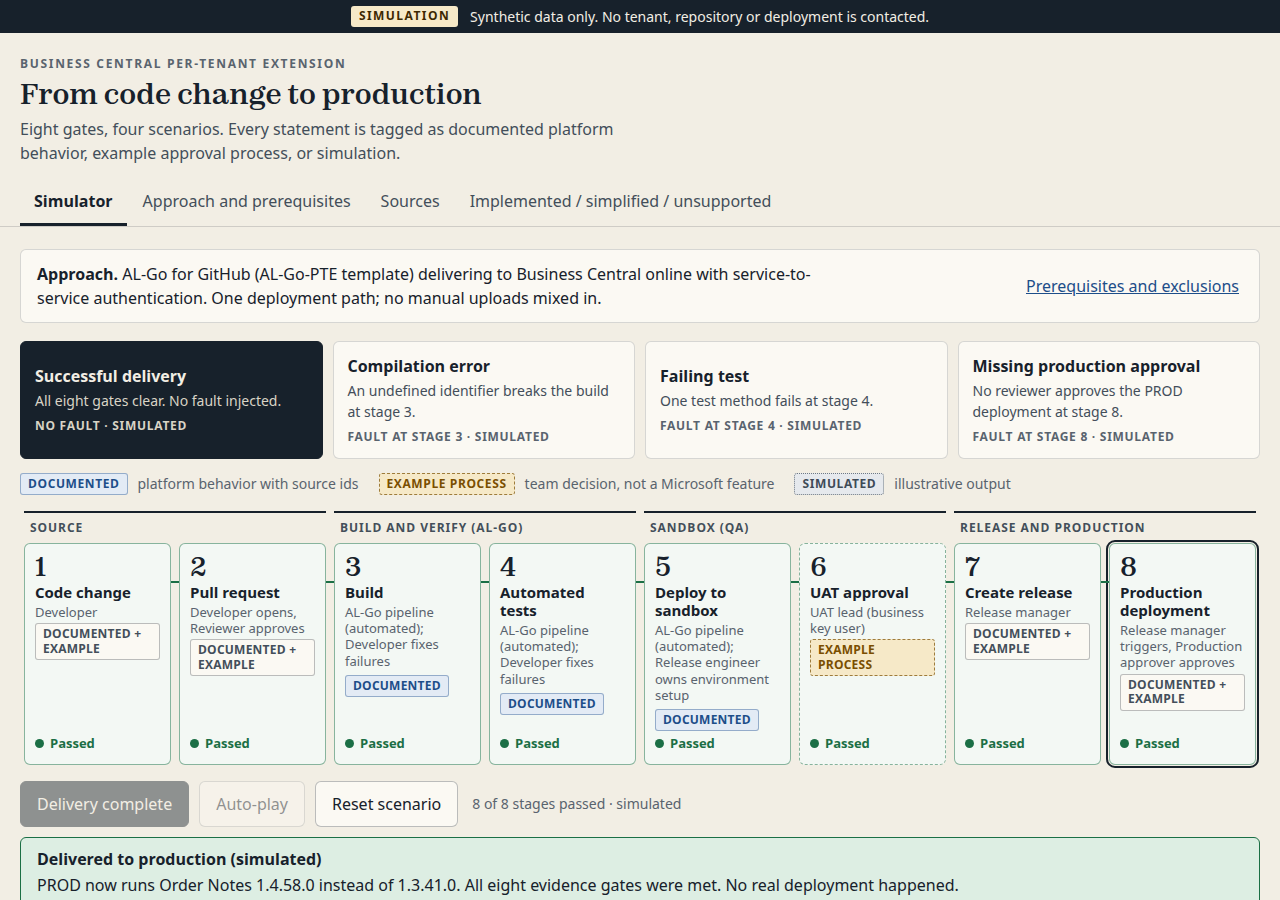
The simulator also has three failure scenarios for developers: a compilation error, a failing test, and a missing production approval.
Step 2: The customer showcase. I asked Computer for a second app with one fictional story (“Add a delivery instruction field to a sales order”), five stages in plain language, and only the happy path. Internal testing, customer approval, and production release had to stay separate stages.
Step 3: Auto-play and substeps. The last prompt added auto-play and 12 substeps with professional terms, from the requirements meeting to UAT sign-off, release, and production deployment. An environment strip shows where the change is: Development, UAT, or Production. One run takes about one minute.
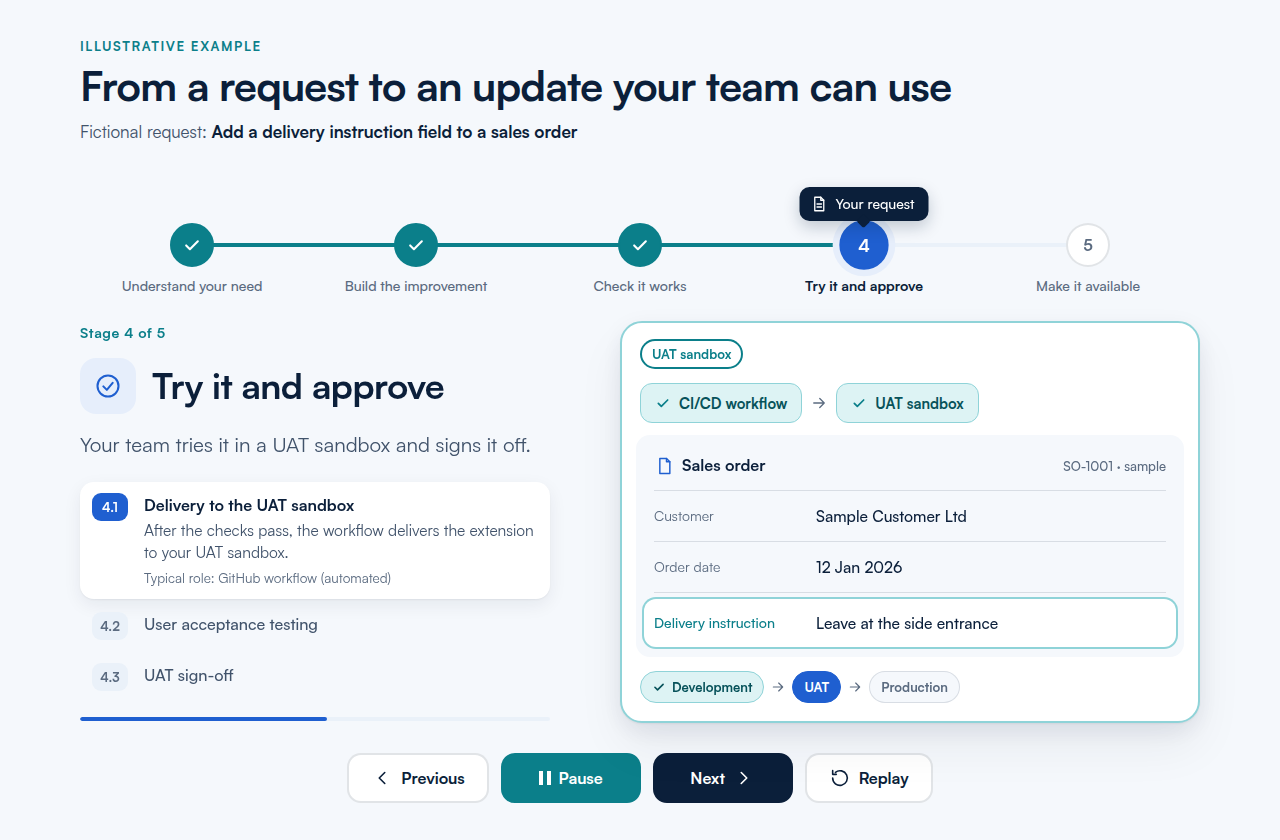
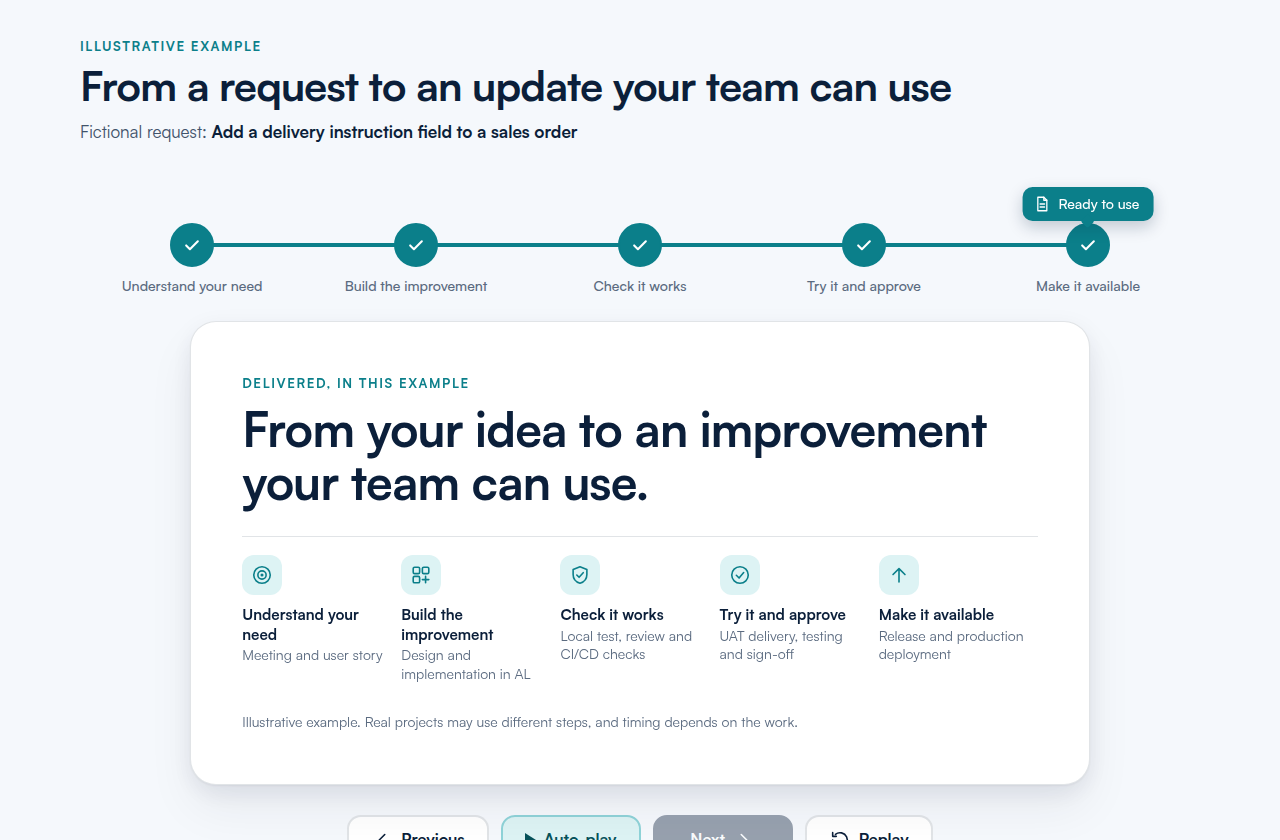
Each prompt ended with a completion rule: test the controls, check desktop and mobile layouts, and report what could not be verified. Computer reported, for example, that it tested only in desktop Chromium, not on real phones.
What is intentionally simple
- Three prompts and one fictional change on one sales order.
- Static HTML, CSS, and JavaScript. No backend, and no connection to Business Central or GitHub.
- The roles, the meeting, the user story format, and the UAT sign-off are example process. They are not a Microsoft-mandated workflow, and the showcase says so in its “About this demo” dialog.
Risks/limits
- The apps explain a process. They do not prove that your pipeline works. Check your own AL-Go settings and environments before you show them as “how we deliver”.
- Source rules reduce errors but do not remove them. In the first run, Computer flagged that Microsoft Learn marks the automation API extensionUpload endpoint as deprecated, and Microsoft plans to remove it in 2027 release wave 1. Computer could not confirm from its sources whether AL-Go still uses it. That is the right behavior, but you must still check it.
- The v2 showcase uses technical terms such as “pull request” and “CI/CD workflow” again. I asked for that, but it makes the showcase less suitable for a fully non-technical audience.
Next iteration
- Publish the showcase as a page on this site and link to it from proposals.
- Make a plain-language version of the substeps for business users, with the technical terms in a toggle.
Closing note
The prompt rules did most of the work: one approach, named sources, synthetic data, and a clear completion check. Three short prompts then gave me one demo for developers and one for customers. I would still review every claim before a customer sees either.