
Build a Custom Marketplace and Plugins for the GitHub Copilot App
Note: This blog is a personal notebook. I write it to record what I work on, for my own reference, not to publish it on social media or to promote myself. If a post is still useful to you, I am glad, but that is not why it exists.
This post was published on July 26, 2026. Software versions, product features, links, and tool availability may have changed since then. Always check official documentation for the latest information. Some screenshots show small details. Zoom in on the page to see them clearly.
The GitHub Copilot app loads plugins. A plugin bundles custom agents, agent skills, hooks, and MCP servers into one installable package. A marketplace lists your plugins and gives each one a short, stable install name. This post shows the setup for a Business Central AL team.
Problem
You can install a plugin directly from a repository (OWNER/REPO, OWNER/REPO:PATH, a Git URL, or a local path). That works for one developer, not for a team: each person must know the exact path, nobody sees a catalog, and an administrator cannot control the source.
It is a library without a catalogue: the books exist, but each reader must know the shelf. A marketplace is the catalogue. One small JSON file turns your repository into a named registry, and every developer installs with one short name, plugin@marketplace.
Why this matters
The Copilot app is one surface in a larger extensibility model.
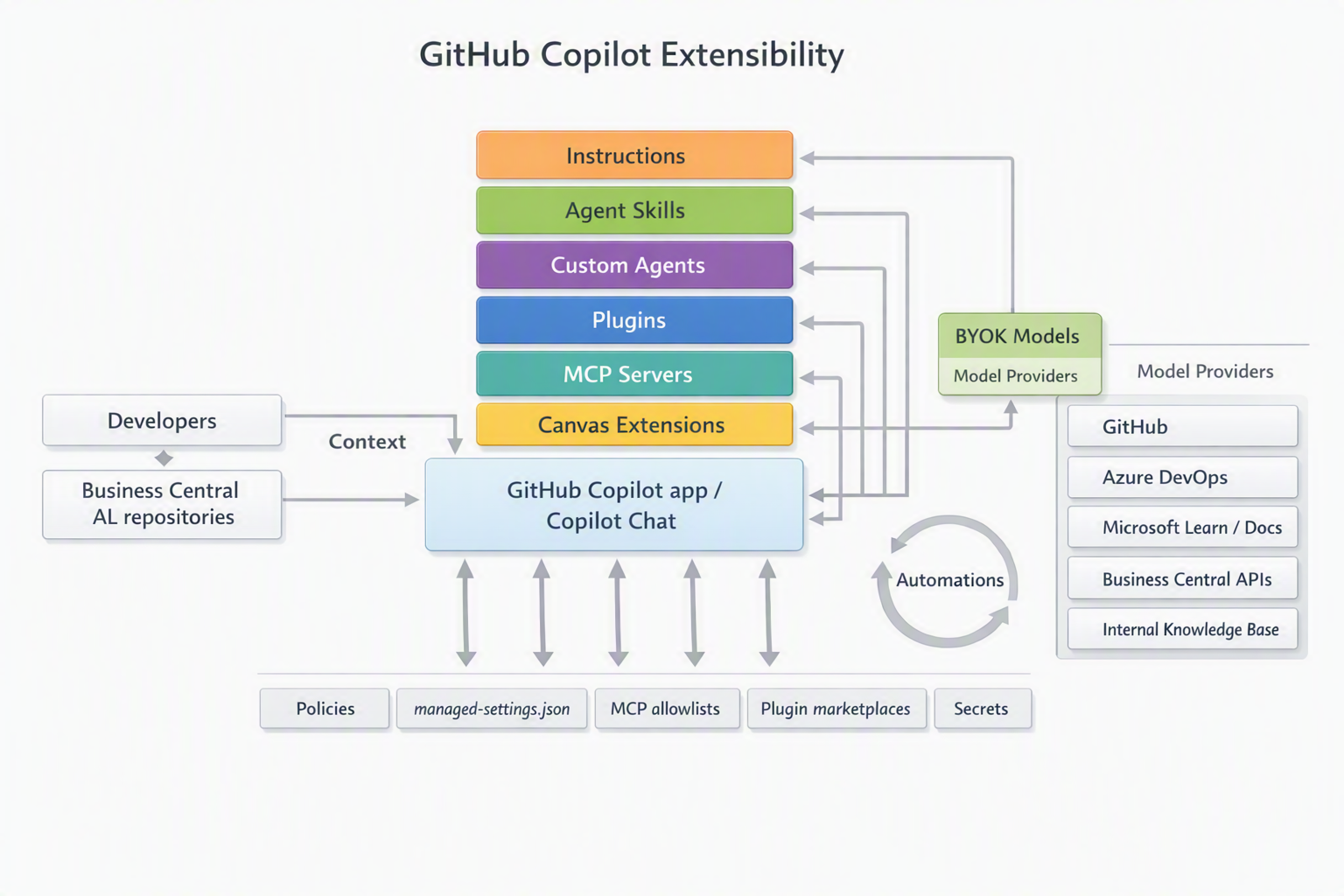
The diagram shows six extensibility layers around the app. Plugins bundle the other layers into one package, and governance controls sit under all of them.
Three benefits matter for a Business Central team:
- Every AL developer uses one stable install command.
- A plugin is a versioned unit. You update the AL review rules or the test logic in one place.
- An enterprise can limit the allowed marketplaces and plugins, which matters in regulated environments.
Architecture
Components
- Marketplace manifest (
.github/plugin/marketplace.json). It names the marketplace and lists its plugins. - Plugin manifest (
plugin.json). It points to the agents, skills, hooks, and MCP configuration of one plugin. - Custom agents (
agents/NAME.agent.md). AL personas with fixed instructions and a fixed tool scope. - Agent skills (
skills/NAME/SKILL.md). The agent loads a skill only when the task needs it. - MCP configuration (
.mcp.json). It declares external tools, such as the status of AL-Go pipelines. - GitHub Copilot app. It registers the marketplace and installs plugins by name.
Copilot registers two marketplaces by default, copilot-plugins and awesome-copilot. Yours becomes the third.
Read-only, suggestion, and approval boundaries
- Read-only. MCP tools in a plugin use read-only scopes, such as AL-Go workflow status and GitHub issue data.
- Suggestion-based. The AL review and test generation skills produce drafts that a developer accepts or rejects.
- Approval-based. Every AL change still goes through a pull request, a code review, and the AL-Go pipeline.
Plugins that push AL code to a branch without review need stronger governance and are not covered here.
One repository, one marketplace, two plugins
One GitHub repository is both the marketplace and the plugin source, the simplest pattern for a team-owned toolkit.
bc-copilot-marketplace/                 (GitHub repository)
├── .github/plugin/marketplace.json     (marketplace manifest)
├── plugins/
│   ├── al-code-review-toolkit/         (plugin 1, with plugin.json)
│   └── al-test-automation-toolkit/     (plugin 2, with plugin.json)
Copilot takes the marketplace name from the name field in marketplace.json, not from the repository. Give both the same name.
Demo steps
- Create a GitHub repository, for example
bc-copilot-marketplace. - Add
.github/plugin/marketplace.jsonwith thenamefield, theownerobject, and thepluginsarray. Each plugin gets a name, a version, and asourcepath such as./plugins/al-code-review-toolkit. - Add each plugin folder under
plugins/with its ownplugin.json,agents/,skills/, and.mcp.json. - Push the repository to GitHub.
-
In the Copilot app settings, select Plugins, add the marketplace, and install both plugins. Or use the terminal:
copilot plugin marketplace add OWNER/bc-copilot-marketplace copilot plugin install al-code-review-toolkit@bc-copilot-marketplace copilot plugin install al-test-automation-toolkit@bc-copilot-marketplace - Confirm with
copilot plugin list. The agentsbc-al-reviewerandbc-al-test-engineermust appear, with the skillsal-code-review,al-performance-check, andal-test-generation. - Start a session, type
/agent, selectbc-al-reviewer, and ask for a review of an AL pull request diff. - In a second session, select
bc-al-test-engineerand ask for an AL test codeunit for a posting routine.
The official reference lists every manifest field: About GitHub Copilot plugins and the CLI plugin reference.
What is intentionally simple
- One repository and two plugins. Enough to prove the pattern for one team.
- Read-only MCP scope. The example reads AL-Go pipeline status and writes nothing.
- No hooks. Hooks run shell commands at agent lifecycle events, so this post skips them.
Risks and limits
- The cache hides your changes. Copilot caches the plugin content after the install. Push your change, then run
copilot plugin update NAMEor install again. - Your marketplace does not update itself. Only the two built-in marketplaces refresh at the start of a session. Set
autoUpdate: trueon your marketplace entry in your user settings to match. - Name collisions behave in two ways. Agents and skills load with first-found-wins, so a project-level or personal agent with the same name silently wins over the plugin. MCP servers use last-wins, so a plugin can replace a server that you configured before. Use a prefix such as
bc-al-. - Copilot does not validate AL. Agents and skills do not replace the AL compiler, the code analyzers, or the AL-Go test runs. Treat all agent output as a draft.
- Enterprise policy can block the install. With
strictKnownMarketplacesinmanaged-settings.json, Copilot allows only the listed marketplaces.
Next iteration
- Add a third plugin for AL upgrade checks (Next Major and Next Minor).
- Add the Microsoft Learn MCP server to ground AL API answers in official documentation.
- Pin each plugin source to a commit with a full 40-character
sha. - Ask your enterprise administrator to add the marketplace to
managed-settings.json, so every developer gets it at sign-in.
Closing note
A marketplace is not a public catalog. It is one JSON file in .github/plugin/ that turns a GitHub repository into a named plugin source for the GitHub Copilot app. Every AL change still goes through the same pull request and the same AL-Go review.